Table of Contents >> Show >> Hide
- 1. Install a Smart Thermostat for Comfort and Lower Bills
- 2. Upgrade to Smart Lighting for Convenience and Ambience
- 3. Add Smart Plugs to Control “Dumb” Devices
- 4. Use Smart Locks and Video Doorbells for Security and Convenience
- 5. Add a Smart Speaker to Tie It All Together
- How to Prioritize Your Smart Home Upgrades
- Bonus: Real-World Experiences with Smart Home Upgrades
- Conclusion
Remember when “smart home” meant a clapper light and a universal remote that never quite worked?
Good news: we’ve moved on. Today’s smart home upgrades are more affordable, easier to install,
and actually helpful in day-to-day life. Done right, they can save time, cut energy bills, and
make your home feel safer and more comfortablewithout turning your living room into a sci-fi movie set.
In this guide, we’ll walk through five high-impact smart home upgrades that offer real value:
a smart thermostat, smart lighting, smart plugs, smart locks and video doorbells, and smart speakers.
We’ll cover what they do, how they make life easier, and what to look for before you buy.
1. Install a Smart Thermostat for Comfort and Lower Bills
Why a smart thermostat is a game-changer
Heating and cooling quietly eat a big chunk of your utility bill every month. A smart thermostat
gives you better control over that cost without asking you to obsess over temperature settings.
Instead of manually bumping the thermostat up and down, you can:
- Set schedules that match your routine (wake, work, sleep, weekends).
- Let the thermostat learn your habits and adjust automatically.
- Use geofencing so the system turns down when everyone leaves and warms up before you get home.
- Control everything from your phone or with voice commands.
Studies of smart Wi-Fi thermostats consistently show typical heating and cooling savings in the
range of about 10–15% for many households, especially when features like scheduling and
occupancy sensing are used effectively. In some cases, optimized systems have documented even
higher savings when paired with smarter settings and good home insulation.
Everyday ways this makes life easier
Picture this: you crawl into bed and realize the house feels like a freezer. Instead of getting
out from under the covers, you adjust the temperature from your phone. On a hot summer afternoon,
you can cool down the house before you pull into the driveway. If you travel often, a smart
thermostat lets you keep the home at an efficient baseline temperature and then warm it up the
day you return.
What to look for when you buy
- Compatibility: Make sure it works with your HVAC system and check whether you have a C-wire.
- Energy reports: Monthly usage reports make it easy to see what’s working.
- Presence detection: Motion or geofencing features help automate away/at-home settings.
- Smart home ecosystem: Look for support for Google Home, Amazon Alexa, or Apple Home, depending on what you already use.
2. Upgrade to Smart Lighting for Convenience and Ambience
Why smart lighting is usually the best first upgrade
Smart lighting is one of the easiest ways to dip your toes into home automation. Swap a few bulbs
or add smart switches, and suddenly you can:
- Turn lights on or off with your phone or voice.
- Set schedules and scenes (movie night, dinner, early morning, bedtime).
- Dim lights without installing a traditional dimmer switch.
- Change color temperature or even color in some bulbs.
This isn’t just about mood lighting (though “cozy warm white” is always a win). Smart lighting can
also support your sleep and productivity. Warmer tones at night help you wind down, while brighter,
cooler light during the day can help you feel more alert in a home office.
How smart lighting makes life easier
Ever left the house and wondered if you left the lights on? With smart lighting, you can check and
switch them off from anywhere. You can set hallway or bathroom lights to come on dimly in the middle
of the night, which is a lot gentler than a full-brightness eye shock at 2 a.m.
Families also love “one-tap” or voice-controlled routines:
- “Good night” turns off all downstairs lights, locks the door (if you have a smart lock), and dims bedroom lamps.
- “Movie time” dims overhead lights to 30% and turns on accent lamps.
- “Away” mode randomly cycles a few lights in the evening to make the home look occupied.
Smart bulbs vs. smart switches
Smart bulbs are great for lamps and smaller setups. For larger rooms or entire homes, smart
switches are often more cost-effective and work even when someone uses the wall switch like a
normal human being. Many homeowners end up using a mix: bulbs for lamps and accent lighting,
switches for main fixtures.
3. Add Smart Plugs to Control “Dumb” Devices
Turn almost anything into a smart device
Smart plugs are tiny adapters that plug into your existing outlets. You plug a devicelike a lamp,
fan, coffee maker, or space heaterinto the smart plug. From there, you can turn that device on or
off with an app, voice command, or schedule.
They’re inexpensive, easy to install, and perfect if you rent or don’t want to replace a bunch of
appliances. Many models also include basic energy monitoring, letting you see which devices quietly
drive up your power bill.
Everyday uses that people actually stick with
-
Coffee and tea routines: Set a smart plug to power on your coffee maker right before
you wake up so all you have to do is pour. - Seasonal decor: Automate holiday lights so they turn on at sunset and off at bedtime.
-
Fans and heaters: Use schedules or temperature-based automations (via your thermostat
or a separate sensor) to control plug-in fans and heaters more safely and efficiently. -
“Did I unplug that?” anxiety: Check and switch off hair tools or irons remotely if
you’re worried you left something running.
Because some smart plugs track energy usage, they’re also a simple way to identify “energy hogs”
like older TVs, gaming consoles in standby, or always-on electronics. Once you see the numbers,
it’s easier to justify small changes that cut monthly costs.
What to look for in a smart plug
- Amperage rating: Make sure it’s safe for the device you’ll plug in.
- Energy monitoring: Helpful if you care about tracking usage.
- Integration: Check compatibility with your preferred ecosystems like Alexa, Google, or Apple.
- Form factor: Slim designs are better for tight spaces or power strips.
4. Use Smart Locks and Video Doorbells for Security and Convenience
Smart locks: keys, but better
If you’ve ever been locked out of your house, hidden a spare key in a very obvious “secret” spot,
or tried to coordinate key copies for guests or cleaners, a smart lock can be a life-saver.
With a smart lock, you can:
- Lock or unlock the door from your phone.
- Give guests or service providers temporary access codes.
- Check whether the door is locked without getting out of bed.
- Set the door to lock automatically after a certain time or when you leave.
Many models fit over existing deadbolts, so you can keep your existing keys but gain smart features.
For families with kids or frequent visitors, programmable codes mean you no longer have to juggle
physical keysor worry about someone losing them.
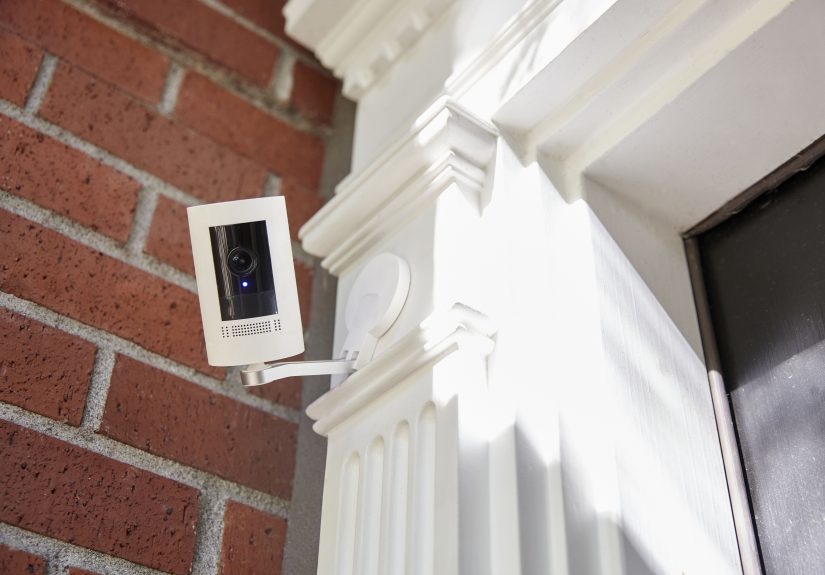
Video doorbells and smart cameras
Pairing a smart lock with a video doorbell gives you eyes and ears at the front door. You can see who’s
there, talk to them through the app, and even unlock the door remotely if you choose.
Modern smart doorbells and cameras offer:
- Motion detection with customizable zones so you’re not alerted for every passing car.
- Package detection to help keep an eye on deliveries.
- Two-way audio for talking to guests or delivery drivers.
- Cloud or local video storage, depending on the system.
For many homeowners, this combo isn’t just about security. It’s about peace of mind. You can check
whether the kids got home, see when a package arrives, or verify that the dog walker showed up
all from your phone.
Keep privacy and subscriptions in mind
Before you buy, check whether the system requires a monthly subscription for recordings or advanced
features. Also review privacy optionssuch as local storage, end-to-end encryption, or the ability
to turn off microphones and cameras when you’re home.
5. Add a Smart Speaker to Tie It All Together
Your voice as the remote control
Smart speakers and voice assistants act as the “front door” to your smart home. Once set up, you can
talk to your home instead of tapping through five different apps:
- “Turn off the kitchen lights.”
- “Set the thermostat to 72 degrees.”
- “Lock the front door.”
- “Start the robot vacuum.”
Smart speakers have gone from novelty gadgets to everyday tools. Market research shows that a
substantial share of U.S. households now own at least one smart speaker, with adoption expected to
keep growing as new AI-powered assistants become more conversational and capable. For many people,
the first smart device they buy is an affordable speaker, and everything else gets added around it.
More than just home control
Beyond controlling devices, smart speakers can:
- Set reminders, timers, and calendar alerts.
- Read the weather and news updates.
- Play music, podcasts, or white noise.
- Serve as an intercom between rooms in larger homes (in some systems).
This is especially helpful in busy households. You can set a “dinner timer” while your hands are
covered in food, or ask for measurement conversions mid-recipe without touching your phone.
Choosing the right ecosystem
Most people end up picking a voice assistant based on what they already use: Google Assistant,
Amazon Alexa, or Apple’s ecosystem. There’s no single right answerchoose the one that supports
the devices you already own and the services you already rely on for music, calendars, and reminders.
How to Prioritize Your Smart Home Upgrades
You don’t have to transform your entire house in one weekend. In fact, trying to do everything at
once can get overwhelming (and expensive). Instead, think in layers:
- Start with your biggest pain point. Is it high energy bills, poor lighting, or security worries?
- Pick one or two upgrades. For many people, that’s a smart thermostat plus smart lighting or plugs.
- Choose an ecosystem. Decide whether you’ll primarily use Google, Amazon, or Apple for voice control.
- Expand slowly. Add devices one room or one function at a time so you can adjust settings as you go.
A thoughtful, step-by-step approach helps you avoid buying gadgets that look cool but don’t actually
solve a problem in your daily life. The goal isn’t to have the “smartest” house on the blockit’s to
have a home that quietly does more of the work for you.
Bonus: Real-World Experiences with Smart Home Upgrades
To make these ideas more practical, let’s look at how different types of households often use the
same five upgrades in very different ways.
The busy family juggling school, work, and sports
In a household where everyone is constantly in and out, a smart thermostat and smart locks tend to
shine. Parents use location-based automation so the thermostat automatically switches to an
energy-saving mode when the last person leaves. The front door locks itself after a set time, and
older kids have unique access codes instead of juggling keys.
Smart plugs and lighting routines simplify chaotic evenings. A “homework” scene might turn on bright
light at the kitchen table while dimming the living room to reduce distractions. A plug-in lamp in
the kids’ room can be set to turn off gradually at bedtime, easing the transition to sleep without a
nightly negotiation.
The renter in a small apartment
Renters often can’t rewire or replace major fixtures, but they can still build a surprisingly capable
smart home. Smart bulbs, smart plugs, and a smart speaker are the MVPs here.
With just a few smart bulbs, a renter can create “work,” “relax,” and “movie” scenes that change the
feel of a small space instantly. Smart plugs handle things like a space heater, a fan, and a string
of decorative lights. A compact smart speaker pulls everything together and doubles as a music system.
Because these devices are portable, they’re easy to take along to the next place. That makes them
low-risk, high-value investments.
The remote worker with a home office
For remote workers, comfort and focus are everything. A smart thermostat keeps the office at a steady,
comfortable temperature without overcooling or overheating the rest of the house. Smart lighting
provides bright, cool-toned light in the morning and softer light later in the day to reduce eye
strain.
Smart plugs can automatically power on monitors, desk lamps, and even a coffee maker at the start of
the workday. At closing time, a single routine can shut everything down, which helps create a
psychological “end of work” cue. For people who struggle to unplug, that’s surprisingly powerful.
The older adult aging in place
Smart home upgrades can be especially helpful for older adults who want to stay independent. A smart
speaker allows for hands-free calls, medication reminders, and quick access to information. Smart
lighting reduces the risk of falls by automatically turning on pathway lights at night. Smart locks
and video doorbells let family members check in remotely or help manage visitors.
In many homes, family members set up a few simple routines instead of overwhelming older adults with
dozens of apps and controls. The focus shifts from “fancy tech” to practical safety: well-lit
hallways, secure doors, and easy communication.
What all these experiences have in common
Across all these scenarios, the upgrades that stick are the ones that remove friction. No one wants
complicated automations they have to constantly fix. The most successful smart homes start with a
small number of clear winslike a thermostat that saves money, lights that behave the way you wish
they always had, or a lock that never leaves you wondering if the door is really secured.
If you approach smart home upgrades with that mindset“What’s one annoying thing I can automate
today?”you’ll build a system that genuinely makes life easier instead of just adding more screens,
apps, and notifications.
Conclusion
Smart home technology isn’t about impressing your friends with futuristic gadgets. It’s about quietly
solving everyday problems: wasted energy, lights left on, doors accidentally left unlocked, or
stumbling around in the dark looking for a switch. By focusing on five core upgradessmart
thermostats, smart lighting, smart plugs, smart locks and doorbells, and smart speakersyou can build
a flexible, future-ready system one step at a time.
Start small, pick an ecosystem, and choose devices that clearly match your daily routine. In a few
weeks, you may find that the most helpful tech in your home isn’t the latest TV or phoneit’s the
invisible automations quietly working in the background, making your life easier every single day.