Table of Contents >> Show >> Hide
- Step 1: Pick the goal (and write a tiny shot list)
- Step 2: Choose the best room (follow the light, not your heart)
- Step 3: Gather gear (use what you have, upgrade what matters)
- Step 4: Set a clean background (because your background is a co-star)
- Step 5: Create soft, flattering light (natural or artificial)
- Step 6: Dial in camera settings (or smartphone controls) for sharp, clean images
- Step 7: Style the scene (wardrobe, props, and tiny details)
- Step 8: Pose and direct (yes, even if it’s just you)
- Step 9: Shoot like a pro (test, refine, repeat)
- Step 10: Add “production value” with simple variations
- Step 11: Edit for a polished, natural finish (don’t overcook it)
- Common mistakes that secretly sabotage home photo shoots
- Quick example setups (steal these)
- Real-World Experiences: What Actually Happens When You Try This (and What You Learn)
- Conclusion
Good news: you don’t need a $10,000 studio to get “wait… you shot that at HOME?!” results. You need a plan, flattering light, a background that isn’t quietly ruining your life, and a few simple camera moves. The rest is just practice (and maybe bribing your pet to stay still).
This guide walks you through 11 practical steps to build a pro-looking home photoshoot setup for portraits, products, content creation, or family picsusing either a camera or a smartphone. It’s detailed on purpose, because “just wing it” is how you end up with a forehead shine you can see from space.
Step 1: Pick the goal (and write a tiny shot list)
Professional-looking photos start before you touch the camera. Decide what you’re shooting, because a headshot, a product photo, and a “soft dramatic vibe” selfie all want different lighting and backgrounds.
Do this in 10 minutes:
- Choose your style: clean & bright, moody & dramatic, colorful & playful, etc.
- Pick your output: Instagram (4:5), website banner (wide), LinkedIn (square-ish), Etsy (consistent product angles).
- Write a shot list: 6–12 must-have images so you don’t realize later you forgot the “front view” of your product or a “smiling headshot.”
Pro tip: If you’re shooting for a brand or portfolio, consistency beats “random greatness.” A cohesive set looks more professional than one masterpiece surrounded by chaos.
Step 2: Choose the best room (follow the light, not your heart)
Pick a space with room to step back and light you can control. A bigger room helps, but you can absolutely shoot in a bedroom if you’re intentional.
Quick checklist for a “good” home studio corner:
- A big window (great for soft natural light) or space for a light stand.
- At least 6–10 feet between camera and subject for portraits (more if you want full-body).
- Clear background zone so you’re not cloning out laundry baskets later.
- Power outlets if you’re using continuous lights.
If the light changes constantly (sun blasting through one minute, gloomy the next), you’ll fight consistency all day. Control and repeatability are the real “pro” ingredients.
Step 3: Gather gear (use what you have, upgrade what matters)
You can shoot professionally with a phone, a mirrorless camera, or a DSLR. The “must-haves” are mostly about stability and light shaping.
Minimum setup (budget-friendly):
- Camera or smartphone (yes, really)
- Tripod (or a stable surface + timer)
- One key light source (window light or a continuous LED)
- Reflector/bounce (white foam board, poster board, or a $10 reflector)
Nice-to-have upgrades (highest impact first):
- Softbox or umbrella to soften harsh light
- Backdrop support + seamless paper/muslin for clean backgrounds
- Second light for fill, background, or hair/rim separation
- Remote shutter (or phone/watch trigger) for sharpness and comfort
Reality check: a fancy camera in ugly light still looks like a fancy camera in ugly light. Light quality is the glow-up.
Step 4: Set a clean background (because your background is a co-star)
If your background is distracting, your photo looks less professionaleven if the subject is lit perfectly. Keep it simple and intentional.
Easy professional background options:
- Plain wall (matte is better than glossy)
- Seamless paper (the “infinity sweep” look)
- Neutral fabric (steam it; wrinkles scream “I tried”)
- DIY: a large sheet, curtain, or taped craft paper roll
Spacing rule that fixes 80% of home-shoot problems:
Pull your subject 3–6 feet away from the background. This reduces shadows, improves separation, and helps you blur the background for portraits.
Background booby trap: lines “growing” out of someone’s head (door frames, lamp poles) instantly make photos feel amateur. Scan the edges before you shoot.
Step 5: Create soft, flattering light (natural or artificial)
Soft light is what people mean when they say “Wow, that looks professional.” It’s flattering because it reduces harsh shadows and transitions smoothly across the face or product.
Option A: Window light setup (simple, beautiful)
- Place your subject near a window, slightly angled (about 45°) for natural shaping.
- Use a sheer curtain or thin white sheet to diffuse harsh sunlight.
- Put a white bounce board opposite the window to lift shadows.
Best vibe: bright overcast days or indirect light. Direct sun can work, but it’s like juggling knivesfun only if you know what you’re doing.
Option B: One-light setup (studio look at home)
- Use a softbox or umbrella as your modifier to create broader, softer light.
- Place the light slightly above eye level, angled down for flattering facial shadows.
- Move the light closer for softer light; farther for harder light. (Distance matters a lot.)
Option C: Three-point lighting (maximum control)
- Key light: your main light shaping the subject
- Fill light: softer/less intense light to reduce shadows
- Back or hair light: adds separation from the background
This setup is common in professional portrait and video work because it shapes the face and separates the subject cleanly from the background.
Step 6: Dial in camera settings (or smartphone controls) for sharp, clean images
Sharpness and clean exposure are huge “pro” signals. You don’t need complicated settingsjust the right basics.
If you’re using a camera (DSLR/mirrorless):
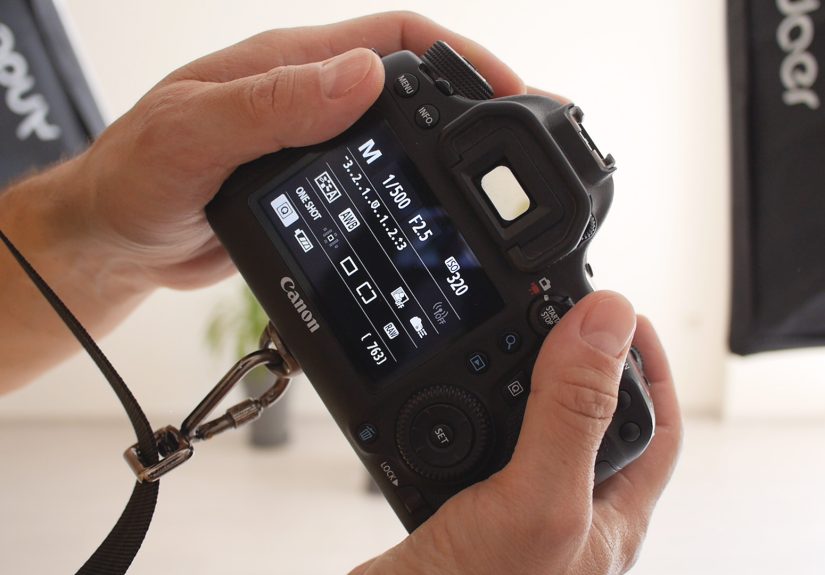
- Aperture: For portraits, try f/1.8–f/4 for background blur. For groups/products, try f/5.6–f/11 for more depth of field.
- Shutter speed: Aim for 1/125 or faster for people (faster if they move a lot).
- ISO: Keep as low as you can without underexposing; raise it when needed instead of getting blur.
- White balance: Match the light source (daylight, tungsten/incandescent, etc.) for natural skin tones.
If you’re using a smartphone:
- Clean the lens (seriouslythis is the easiest upgrade on earth).
- Tap to focus on the subject’s eye (or the product label).
- Lock focus/exposure (AE/AF lock on iPhone) so the phone doesn’t “helpfully” change brightness mid-shot.
- Adjust exposure slightly down for richer tones if highlights are blowing out.
- Use the timer to reduce shake.
Consistency tip: Avoid mixing different types of lights (like warm lamps + cool window light) unless you’re intentionally creating a mixed-color look. Mixed lighting often creates odd skin tones.
Step 7: Style the scene (wardrobe, props, and tiny details)
Professional photos look styledeven when they’re “casual.” That’s not magic; it’s preparation.
For portraits:
- Wardrobe: Solid colors photograph cleanly; tiny busy patterns can moiré.
- Coordinate, don’t match: especially for couples/familiesaim for a palette, not identical outfits.
- Grooming: blotting paper reduces shine; a little matte powder helps under strong light.
For product/content photos:
- Prop with purpose: add context (coffee cup with a journal), but keep the product the hero.
- Remove dust: product photos reveal everything. A microfiber cloth is your best friend.
- Keep it level: crooked horizons scream “home shoot” in the wrong way.
Step 8: Pose and direct (yes, even if it’s just you)
Posing isn’t about turning people into mannequins. It’s about small adjustments that look natural on camera.
Fast posing wins for portraits:
- Angle the shoulders slightly instead of facing the camera straight-on.
- Chin forward and slightly down (tiny move, big jawline improvement).
- Hands need a job: hold a jacket lapel, touch hair, hold a prop, pocket a thumbanything but “dangling claws.”
- Eyes to light: catchlights (little reflections) make eyes look alive.
If you’re shooting solo:
- Use a tripod + timer/remote, and mark a spot on the floor with tape.
- Take 10 test shots, adjust, then do your “real” set once the setup is locked.
Step 9: Shoot like a pro (test, refine, repeat)
The pros don’t just “start shooting.” They test, adjust, and build consistency.
A simple pro workflow:
- Take a test shot and check exposure + shadows + background distractions.
- Adjust one thing at a time (light position, subject distance, exposure).
- Lock the setup once it looks rightthen shoot variations.
- Zoom in to check sharpness (eyes/product details).
Lighting hack: If shadows look harsh, don’t panicmove your light closer (with diffusion) or add bounce fill opposite the key light.
Step 10: Add “production value” with simple variations
Once you have a clean, consistent base shot, variations make your set look high-end (and give you options so you’re not stuck with one expression forever).
High-impact variations to try:
- Change the angle: eye-level, slightly above, slightly below (use carefully for faces).
- Change the crop: wide, medium, close-up detail.
- Change the background: swap colors, add texture, or shoot a clean version and a lifestyle version.
- Change the mood: turn off fill for drama, add backlight for separation, or use a warmer white balance for cozy tones.
Safety note: If you’re using stands, weigh them down. A falling light stand is a terrible way to add “motion blur.”
Step 11: Edit for a polished, natural finish (don’t overcook it)
Editing is where professional work gets its final “clean and intentional” look. The goal is enhance, not “turn humans into wax statues.”
A simple, professional edit checklist:
- White balance: neutralize weird color casts for accurate skin/product color.
- Exposure + contrast: brighten/darken overall exposure, then add gentle contrast for depth.
- Highlights/shadows: recover detail (especially in bright windows or dark hair).
- Crop + straighten: fix tilted horizons and tighten composition.
- Retouch lightly: remove temporary blemishes, reduce distractions, keep skin texture.
- Sharpen carefully: enough to look crisp, not crunchy.
Export tip: For web, use appropriately sized images (so your site doesn’t load like it’s powered by a potato). For social, export at high quality but consider platform-friendly dimensions.
Common mistakes that secretly sabotage home photo shoots
- Overhead room lighting creating raccoon-eye shadows
- Subject too close to the background creating harsh shadow shapes
- Mixed color temperatures (window light + warm lamp = “why is my face green?”)
- Underexposure leading to noisy images when you brighten later
- No catchlights making eyes look flat
- Wrinkled backdrops stealing attention
Quick example setups (steal these)
1) Professional headshot with a window
- Subject 3–6 feet from a plain wall
- Window at 45° to face
- White foam board opposite window for fill
- Camera: f/2.8–f/4, 1/125+, ISO as low as possible
2) Product photo for an online store
- Seamless white paper sweep on a table
- Two lights at equal distance for even illumination (or one window + bounce)
- Tripod + consistent angle for every product
- Camera: f/8–f/11 for sharpness across the product
3) Content creator “creator corner”
- Soft key light slightly above eye level
- Small back/hair light for separation
- Background practical (lamp, plant) kept subtle
- Phone: lock AE/AF, exposure slightly down, use timer/remote
Real-World Experiences: What Actually Happens When You Try This (and What You Learn)
Experience #1: The “I need a LinkedIn headshot by tonight” sprint. A lot of people start with panic energy and a random wall. The first test shots usually look… fine-ish, but the face is flat and the background is giving “apartment listing photo.” The breakthrough tends to be simple: they move near a window, turn off the ceiling light, and suddenly the light softens. Then they add a piece of white poster board on the shadow side, and the photo goes from “I took this in my house” to “I might work here.” The biggest surprise is how much posture matterschin forward, shoulders angled, eyes toward the lightand how quickly a clean background makes the image feel intentional.
Experience #2: The Etsy seller who learns the hard truth about dust. Product photography at home is where confidence goes to be humbled by lint. People often start with a kitchen table and a lamp, then wonder why their product looks dull and the shadows are weird. The “aha” moment usually comes when they make a simple paper sweep (that curved “infinity” backdrop) and place the product farther from the background. With just one diffused light (window or softbox) and a bounce card, reflections become manageable and edges look clean. After that, they discover the repeatability game: mark where the tripod goes, keep the same angle, and shoot a consistent set (front, 45°, detail, lifestyle). The photos look more professional not because the gear got fancy, but because the process got consistent.
Experience #3: The family portrait that turns into a mini movie set. Families often try this thinking, “We’ll do it in 15 minutes.” Then someone’s shirt clashes with the couch, the dog won’t sit, and the toddler becomes a blur-powered superhero. The best outcomes happen when they set the camera first (fast shutter speed), then do a quick wardrobe sanity check (coordinated colors, no tiny patterns), and choose one spot with stable light. They might use a tripod and a 10-second timer, then run into frame like it’s an action film. The professional trick here is volume: they take lots of frames, keep it fun, and treat it like a game. Later, when they pick the best expressions and do light edits (white balance, exposure, straighten, crop), the final photo looks like a planned shootnot a chaotic living-room event (even though it absolutely was).
What these experiences teach, every time: “Pro-looking” isn’t about a perfect house or perfect gear. It’s about (1) soft, controlled light, (2) a clean background, (3) sharpness and stable settings, and (4) enough attempts to catch the best moment. Most people feel awkward at first, then suddenly get one frame that makes them say, “Oh. That’s it.” The best part? Once you’ve built your home setup once, the next shoot gets dramatically easierand your camera roll gets dramatically less cursed.
Conclusion
A professional-looking home photoshoot is basically a recipe: plan the shot, control the background, make the light soft, lock in sharp settings, and edit with restraint. Do those things, and your home stops being “not a studio” and becomes “a studio that happens to have snacks.”