Table of Contents >> Show >> Hide
- Quick refresher: what “Portal+” actually is
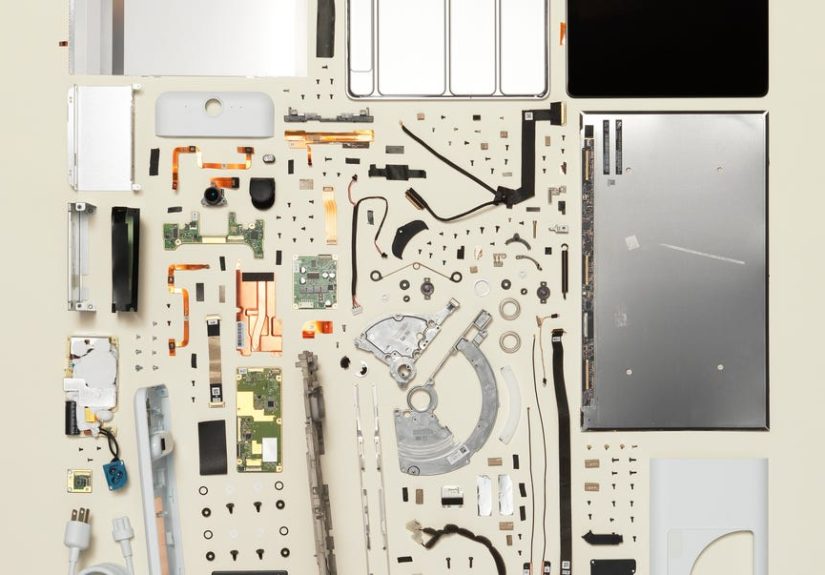
- Teardown-style tour: outside in
- The “smart” part: tracking, framing, and sound
- Privacy: the most important feature is a switch
- Software reality: Messenger, WhatsApp, work apps, and the app gap
- Portal+ in 2026: what changes when a device is discontinued
- Should you buy a Portal+ used? A practical checklist
- Conclusion: what we learned from “taking apart” Portal+
- Bonus: of real-life Portal+ experience
There are two kinds of “smart displays” in the world: the ones that try to do everything, and the ones that do
one thing so well you start forgiving their personality quirks. The Facebook Portal+ (later branded “Meta Portal+”)
was firmly in the second camp. It was built to make video calls feel less like you’re staring into a postage stamp and
more like you’re actually in the roomwithout requiring you to balance a laptop on a cereal box like a doomed
remote-worker Jenga tower.
But Portal+ is also a fascinating artifact of a very specific era: peak “put a camera in the living room and people will
totally be chill about it.” Spoiler: people were not totally chill about it. Even more spoiler: the Portal line was later
discontinued as a consumer product, which makes the Portal+ an even juicier teardown targetphysically and conceptually.
So, let’s do a teardown-style breakdown: what it is, what’s inside (and on the outside), why it worked, why it didn’t,
and what it means to own one now.
Quick refresher: what “Portal+” actually is
A smart display obsessed with video calling
The Portal family was designed around one mission: smoother, more human video chatting, primarily through Messenger and
WhatsApp. Instead of forcing you to sit perfectly still in a single chair like you’re being painted in a Renaissance
portrait, it used a wide-angle camera and software smarts to keep you framed as you moved around.
Portal+ was the “big screen, big sound” versionespecially the redesigned 2021 model with a tilting 14-inch display and
a fabric-wrapped speaker base. Think “kitchen counter command center,” “grandparents’ favorite screen,” and “the one
device that made family calls loud enough for Uncle Bob to stop yelling ‘CAN YOU HEAR ME?’”
The 2021 Portal+the one people mean when they say ‘Portal+’ now
Facebook refreshed Portal+ in 2021 with a 14-inch touchscreen (2,160 x 1,440), a high-res panel that looked sharp for
both calls and casual streaming. It also doubled down on the core pitch: an ultra-wide “Smart Camera,” smart audio,
and hands-free calling that feels less like a meeting and more like a hangout.
Teardown-style tour: outside in
A real teardown starts with screws. A practical teardown starts with a towel (to avoid scratching things) and a deep
emotional acceptance that you’re about to learn where manufacturers hide clips. We’re doing the practical versionwalking
through the Portal+ hardware like we’re peeling an onion, except the onion has a touchscreen and your aunt’s face on it.
1) The 14-inch tilting display: the star of the show
The most obvious “Portal+” upgrade is simply screen real estate. Fourteen inches is big enough that a
group call doesn’t look like a tiny courtroom drama. The screen tilts up and down, which is great because kitchens and
living rooms are full of surfaces at awkward heightscounters, shelves, sideboards, and that one table you keep meaning
to replace but it has “good bones.”
High resolution matters here more than it does on smaller smart displays. When a device’s main job is showing people,
you want faces to look like faces, not like watercolor art titled “Bandwidth Constraints, 2021.”
2) The camera bar: wide-angle plus tracking brains
Portal+ uses an ultra-wide front camera (12MP on the 2021 model) designed to see more of the room than a typical laptop
webcam. The point is not “surveillance chic.” The point is “you can stand up to stir pasta and still remain a
recognizable human.”
The clever part is the software layer: it can automatically pan and zoom digitally to keep you centered. In other words,
it’s the camera operator you never hired. It’s also the camera operator who never takes a lunch break, which is both
impressive and mildly unsettling, depending on your relationship with technology.
3) Microphones: the unsung heroes with a mute switch
Video calls fail in two ways: “I can’t see you” and “I can’t hear you,” and the second one ruins friendships faster.
Portal devices were built with far-field microphones intended to pick up voices across a room. In real-life use, that
translates to fewer “Hold on, let me get closer” moments and more “Wait, why can I hear your blender like it’s in my
house?” moments.
Crucially, Portal has long leaned on physical controls for privacy, including a hardware switch to disable microphones,
plus visible indicators when sensors are off. This becomes a theme, because Portal’s best privacy feature is not a
policy pageit’s a switch you can poke with your finger.
4) Speaker base: why Portal+ sounds bigger than it looks
The fabric-wrapped base isn’t just a design flourish to make it look “homey.” It houses the speakers, and Portal+
reviews consistently praised the sound quality compared with smaller smart displays. That matters because Portal+ is
used across a roomif it can’t fill a space, it can’t do its job.
Practically, better speakers also make Portal+ a decent “background media” device for music or casual videothough its
app and streaming options were never as broad as a full tablet or TV platform.
5) Buttons, shutters, and the ‘I don’t trust you’ toolkit
Here’s where Portal+ gets unexpectedly relatable: it knows you might not trust it. So it gives you a physical camera
shutter (so the lens is actually covered) and microphone controls (so you can hard-mute). Many reviewers highlighted
this “hardware privacy” approach as a genuine strengthbecause it’s something you can verify with your eyeballs, not
your hopes.
If you’re the type of person who puts tape over webcams, Portal+ basically ships with tape that matches the device.
That’s… progress? Maybe?
The “smart” part: tracking, framing, and sound
Smart Camera: surprisingly useful, occasionally too confident
Portal+ camera tracking is the feature that turns skeptics into grudging fans. During a call, it can keep people in
frame as they move around, and it can widen the view when more folks join in. This is genuinely great for:
- Family calls where someone is always walking to fetch something (“Wait, let me show you the dog”).
- Cooking while chattinghands busy, conversation ongoing.
- Group calls where you don’t want everyone pressed together like a band photo.
The downside of an eager camera is that it sometimes behaves like a rookie filmmakerpanning a little late, zooming a
little aggressively, or “helpfully” framing the person who just stood up, even if they stood up to grab a napkin.
It’s not a dealbreaker, but it can create brief moments where your video call feels like a nature documentary narrated
by a device that’s learning what humans do.
Smart Sound: designed to handle real rooms, not ideal rooms
Portal+ tries to make voices clearer and reduce background noiseimportant because people use it in echo-y kitchens and
lived-in living rooms, not in acoustically treated podcast studios. The goal isn’t “perfect audio.” It’s “good enough
that Grandma doesn’t think the Wi-Fi broke every time someone opens a cabinet.”
Privacy: the most important feature is a switch
Portal+ lives at the intersection of “wonderfully convenient” and “the internet has taught me to be suspicious.” That
tension is baked into its identity. On the one hand, the device includes:
- A physical camera shutter to block the lens.
- A microphone disable control (hardware-level intent, not just a software mute).
- On-screen indicators when sensors are off.
On the other hand, Portal was made by Facebook/Metaa company that has spent years rebuilding consumer trust. So even
with strong hardware privacy cues, many buyers still hesitated, and reviewers often framed Portal as a “trust test.”
The device can be excellent at calls and still make people uncomfortable, because the best camera in the world is useless
if it makes you feel watched.
The healthiest way to think about Portal+ is this: treat the shutter and mic switch like seatbelts. Use them when you’re
not actively calling. Make that the default. If you do, Portal+ becomes far easier to live witheven if you remain
skeptical of the broader ecosystem.
Software reality: Messenger, WhatsApp, work apps, and the app gap
Where Portal+ shines: calls and a big friendly screen
Portal+ was built around Messenger and WhatsApp calling, and that’s where it tends to feel most polished. The interface
is generally designed for “walk up and call” simplicity: tap a contact, start a call, and let the camera do the framing
work. For many households, that’s the whole pointespecially for users who don’t want to juggle phones, tablets, and
login prompts.
Work-from-home credibility (yes, really)
During the remote-work boom, Portal positioned itself as a dedicated calling screen so your computer could stay free for
notes and multitasking. That pitch is surprisingly rational. A dedicated device means:
- Your laptop fan doesn’t sound like it’s taking off mid-meeting.
- You don’t have to prop your phone against a mug and pray.
- Calls feel more “room-like,” especially on a 14-inch display.
But Portal+ also carried software limitations that reviewers frequently pointed out: the app selection wasn’t as deep as
a tablet’s, streaming options could feel incomplete, and the overall experience was tuned more for calling than for
being a universal “do everything” screen.
Alexa integration: convenient, sometimes awkward
Portal+ included Amazon Alexa support, which let it function like a smart speaker for basic voice commands, timers, and
smart-home control. In theory, that’s a win. In practice, it sometimes felt like having two assistants in the same room
negotiating who gets to answer first. When it worked, it was handy. When it didn’t, it was the tech equivalent of two
coworkers replying “Per my last email…” to the same thread.
Portal+ in 2026: what changes when a device is discontinued
Here’s the part that matters if you’re reading this today: Portal devices were discontinued as consumer products, and
Meta stopped selling them (with official support information noting they haven’t been available for purchase since late
2022). That doesn’t automatically mean your Portal+ turns into a decorative paperweight, but it does change how you
should evaluate it:
- Support timelines matter. Feature availability can shrink over time as services sunset.
- App ecosystems move on. A calling device is only as useful as the platforms it can still access.
- Security updates matter. Any internet-connected device benefits from ongoing patching.
Translation: Portal+ may still be great hardware, but hardware can’t outlive software forever. The “teardown” lesson is
that a smart display isn’t just a screen and speakersit’s a subscription to continued compatibility, whether you asked
for that subscription or not.
Should you buy a Portal+ used? A practical checklist
If you’re considering a secondhand Portal+ (or you already have one), here’s a grounded checklist that keeps the hype
and the doom in balance:
1) Confirm your must-have calling app still works
If your household lives on WhatsApp, test WhatsApp calling. If it’s Messenger, test Messenger. If you need it for work,
confirm the exact platform you use is supported in your region. If the device can’t do the one job you bought it for,
it’s just a very polite screen.
2) Treat the privacy shutter as the “off” position
Leave the shutter closed and microphones disabled when you’re not calling. Make opening it part of your call ritual,
like buckling a seatbelt or saying “okay, I’m here” at the start of a meeting.
3) Evaluate it as a “call appliance,” not a tablet replacement
Portal+ is best when you want something that’s always ready for a call, sounds good, and shows a big clear picture. If
you expect a full app store and endless streaming options, you’ll end up annoyed at a device that never promised to be
that in the first place.
4) Know when a simpler alternative wins
If you’re just trying to get grandparents on video chat, sometimes a tablet on a sturdy stand is easier, especially if
the family already uses iPads or Android tablets. If you want a general smart display, a mainstream option with an
actively supported ecosystem might be less stressful long-term.
Conclusion: what we learned from “taking apart” Portal+
The Portal+ is a reminder that great hardware can coexist with complicated feelings. As a calling device, it did a lot
right: a large, sharp screen; strong audio; a wide camera with tracking that genuinely improves the flow of real-life
conversations; and privacy controls you can physically verify.
But Portal+ also shows the trade-offs of buying deeply connected hardware: you’re not just buying a deviceyou’re buying
into the long-term support story, the trust story, and the “will this service still exist” story. In Portal’s case, that
story became messy when the consumer line was discontinued.
If you already own a Portal+, the best way to enjoy it is to use it for what it does bestwarm, easy video callsand
to use its physical privacy features like they’re part of the design, not an optional accessory. If you’re shopping
for one now, treat it like a specialized appliance with a ticking software clock, not a forever device.
Bonus: of real-life Portal+ experience
The first time you set up a Portal+, it feels a little like adopting a small, confident robot. You plug it in, it wakes
up instantly, and it gives you that big bright screen that screams, “Put me somewhere visible.” So you do. Usually the
kitchen. Because kitchens are where families accidentally become philosophers.
In daily life, Portal+ is at its best when you forget it’s “tech.” It becomes furniture that happens to call people.
Morning routine: coffee, calendar glance, maybe a voice timer that saves your toast from becoming a charcoal art project.
Then you tap a contact and the screen fills with a facebig enough that you can actually read expressions instead of
playing emotional charades.
The camera tracking is the feature that sneaks up on you. At first you think, “Okay, neat gimmick.” Then you pace while
talkingbecause pacing is a love language for anxious multitaskersand the camera keeps you framed. You don’t have to
apologize for moving. You don’t have to do the awkward laptop lean where you hover in the corner of the shot like a
cryptid. You just… exist, and the call keeps up.
Portal+ also becomes the “family bridge” device. Someone calls from their phone, you answer on the big screen, and
suddenly the living room feels like it has a window. Kids drift in and out. The dog makes a cameo. Someone shouts from
off-screen and the microphones pick it up like they’re auditioning for a spy movie. It’s not cinematic perfection, but
it’s real. It’s the kind of call that doesn’t demand you sit still and perform “video call posture.”
Of course, the privacy ritual becomes part of the relationship. Many owners develop a muscle memory: shutter closed
when not in use, mics off by default, and only open things up when you’re actively calling. It sounds dramatic until you
realize it’s the same vibe as locking your front doornormal, not paranoid. And weirdly, it makes the device feel more
trustworthy, because you’re in charge in a way you can physically confirm.
The frustrations are usually software-shaped. You’ll occasionally bump into the edges of the platform: an app you wish
existed, a streaming option that’s missing, a feature that feels like it should be obvious but isn’t there. And once you
learn the product line is discontinued, you look at the Portal+ differentlylike a really nice kitchen appliance that
might not get spare parts forever. Still, on the days when you call family and the video feels effortless, the device
earns its place. It may not be the future anymore, but it’s still a surprisingly good way to be present.