Table of Contents >> Show >> Hide
- What Is a Speaking Ultrasonic Distance Sensor?
- How Ultrasonic Distance Sensing Actually Works
- What Makes It “Speaking”?
- Main Parts of a Speaking Ultrasonic Distance Sensor
- How It Behaves in the Real World
- Common Problems and How to Fix Them
- Best Use Cases for a Speaking Ultrasonic Distance Sensor
- How to Make One Feel Smart Instead of Annoying
- Why This Technology Still Matters
- Experience: What It’s Like to Use and Tweak One in Real Life
- SEO Tags
Some gadgets beep. Some gadgets blink. And some gadgets do the truly civilized thing: they tell you what is going on. That is exactly what makes a speaking ultrasonic distance sensor so useful. Instead of forcing you to interpret a row of LEDs or guess what a frantic buzzer means, it measures distance and speaks the result out loud. In plain English. Like a tiny electronic parking coach, lab assistant, or robot sidekick that never gets tired of saying, “Object at 18 inches.”
At its core, this kind of system combines two practical ideas. First, an ultrasonic sensor measures distance without touching anything. Second, a speaker or voice module turns that measurement into spoken feedback. The result can be surprisingly handy in garages, workshops, robotics projects, classroom demos, smart home builds, and accessibility-focused devices. It is simple enough for hobbyists to build, but clever enough to feel like magic the first time it works.
What Is a Speaking Ultrasonic Distance Sensor?
A speaking ultrasonic distance sensor is a distance-measuring device that uses ultrasonic sound waves to detect how far away an object is, then announces that distance through audio. The “speaking” part can be created with prerecorded voice clips, text-to-speech, or a sound module that plays short phrases such as “Stop,” “Move closer,” or “Distance is 24 centimeters.”
Think of it as a standard ultrasonic rangefinder with better manners. A normal sensor gives you raw numbers. A speaking sensor gives you numbers you can actually use without staring at a screen. That matters when your hands are busy, your eyes are elsewhere, or the device is meant to support someone who benefits from spoken cues.
How Ultrasonic Distance Sensing Actually Works
The Ping, the Pause, and the Math
Ultrasonic sensors work by sending out a burst of sound at a frequency above human hearing, commonly around 40 kHz. The sound wave travels through the air, hits an object, and bounces back. The sensor measures the round-trip travel time, and the controller converts that time into distance. Since the sound has to travel to the object and back again, the measured path is divided by two.
That basic idea is called time-of-flight measurement, and it is the secret sauce behind everything from beginner-friendly HC-SR04 modules to more advanced industrial ultrasonic sensors. In many designs, the ultrasonic transducer acts as both a sound source and a listener. In other words, it plays speaker and microphone at the same time, which is honestly a pretty good career move for one component.
Why Temperature Matters
Here is the part that surprises many beginners: sound does not move through air at exactly the same speed all the time. It changes with temperature. Warmer air means sound travels faster, which means the distance calculation can drift if the system assumes the world is forever stuck at one perfect room temperature. A speaking sensor that says “12 inches” when the real answer is closer to 13 inches is not a disaster in a school demo, but it can matter in assistive devices, tight parking situations, and precision builds.
That is why better designs add temperature compensation, smoothing, or both. Some sensors and modules can even report temperature directly. If your project speaks measurements aloud, stable output matters even more than flashy output. Nobody wants a gadget that nervously shouts a different number every half second like it just drank six espressos.
What Makes It “Speaking”?
The voice output is what turns a simple sensor into a more human-friendly tool. Instead of reading values from a serial monitor or a tiny display, the user hears actionable information. That spoken feedback can be structured in several ways. A basic version might announce distance every second. A smarter version only speaks when the reading changes by a meaningful amount. An even better version uses zones, such as “Safe,” “Close,” and “Stop.”
This matters because sound design is as important as sensor design. If the device talks constantly, it becomes annoying fast. If it never talks at the right moment, it becomes useless. The best speaking ultrasonic systems are selective. They speak when the information helps, stay quiet when it does not, and avoid repeating the same message so often that users start plotting revenge against the speaker.
Main Parts of a Speaking Ultrasonic Distance Sensor
The Sensor
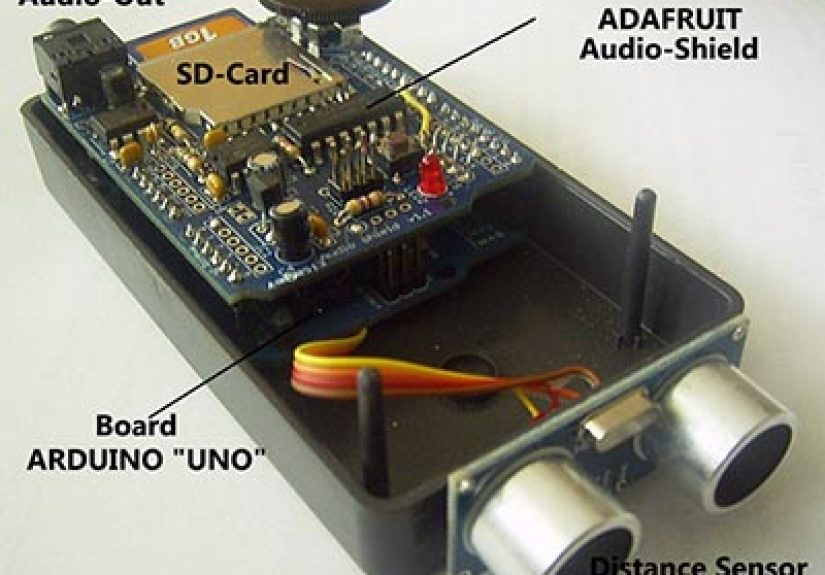
The sensor choice shapes the whole project. Budget-friendly modules such as the HC-SR04 are popular because they are cheap, easy to find, and simple to wire. They are great for prototypes and classroom projects, but they do require care when paired with 3.3V microcontrollers because the echo pin can output 5V logic. That is one of those tiny details that seems harmless right up until it is not.
Other modules, such as the US-100, are more flexible because they can work over a wider voltage range and may offer a serial mode in addition to the usual trigger-and-echo timing method. Some sensors are designed for short-range indoor work, while others are built for longer range, better noise rejection, narrower beams, or harsher environments.
The Controller
A microcontroller reads the sensor, filters the data, applies timing logic, and decides when to speak. An Arduino is a common choice because it is beginner-friendly and well supported. An ESP32 can also work well if you want more advanced audio handling, wireless features, or a smarter interface. The controller is basically the device’s brain, which means it gets blamed for everything, including problems caused by bad mounting, weird room acoustics, and user optimism.
The Audio System
The audio side can be handled by a small speaker and sound module, a text-to-speech chip, or prerecorded clips stored on removable media. Prerecorded audio often sounds cleaner and is easier to control. Text-to-speech can be more flexible, especially if you want dynamic announcements like exact distance readings. The tradeoff is that TTS adds complexity, and some voices sound less “helpful assistant” and more “robot reading warranty terms.”
The Power and Mounting
Power stability matters. So does mounting. An ultrasonic sensor that is slightly tilted can give strange readings, especially around walls, table edges, and angled surfaces. A sensor mounted too low might keep finding chair legs. Mounted too high, it may miss the thing you actually care about. In sensor design, centimeters matter, and so does not mounting the device like it lost a bet.
How It Behaves in the Real World
Ultrasonic sensing has some major strengths. It works in darkness. It is not bothered by an object being transparent or a certain color. It can detect many solid or liquid targets without contact, which is why ultrasonic sensing shows up in object detection, parking aids, tank monitoring, and robotics.
But real life is messier than a wiring diagram. Ultrasonic sensors usually read a conical field rather than a razor-thin line, so they may “see” more than you expect. They can struggle with soft materials that absorb sound, such as foam, thick fabric, or plush surfaces. They can also get confused by angled targets that reflect sound away instead of back to the sensor.
Another issue is low angular resolution. In simple terms, the sensor is good at telling you that something is there, but not always great at telling you exactly what shape it is or which part of a cluttered scene produced the strongest echo. That is why a speaking ultrasonic distance sensor works best when it is designed for a specific purpose instead of trying to be an all-seeing electronic oracle.
Common Problems and How to Fix Them
False Readings from Corners and Clutter
Corners can behave like acoustic tricksters. Sound may bounce off two surfaces and return unexpectedly, creating false detections. This is especially common near walls, shelves, curbs, and narrow indoor spaces. A narrower beam, better sensor placement, or soft material in trouble spots can help reduce these ghost readings.
Crosstalk Between Multiple Sensors
If you use more than one ultrasonic sensor, you must manage crosstalk. That happens when one sensor hears another sensor’s ping and mistakes it for its own echo. The usual fix is simple: do not fire all sensors at once. Trigger them in sequence, add timing delays, and give each one room to breathe. Sensors need boundaries too.
Unstable Voice Output
If the distance reading jumps around, the speech output becomes unbearable. The fix is usually software rather than hardware. A moving average, median filter, or hysteresis threshold can make the spoken result much calmer. For example, instead of speaking every raw reading, announce only when the average distance changes by more than one inch or a few centimeters. Suddenly the device sounds intelligent instead of dramatic.
Best Use Cases for a Speaking Ultrasonic Distance Sensor
One of the best uses is a parking assistant. A sensor mounted in a garage can measure how close a car is to a wall, cabinet, or workbench, then say “Two feet,” “One foot,” or “Stop.” This turns an ordinary garage into a much less exciting place, which is exactly what you want when the alternative is tapping a shelf with your bumper.
Another strong use case is accessibility-focused design. Ultrasonic sensing has been explored in assistive devices that help users detect nearby obstacles, especially where spoken or haptic feedback can complement other mobility tools. A speaking distance sensor can provide hands-free information without requiring someone to look at a screen.
It also works well in workshops, science projects, robotics demos, doorway alerts, and object-positioning tools. Need to know whether a box is in place? Need a robot to warn when it nears a wall? Need a lab device that reports clearance while both hands are holding equipment? Spoken feedback is surprisingly effective in all of these situations.
How to Make One Feel Smart Instead of Annoying
The smartest speaking ultrasonic devices do not just measure. They interpret. A strong design starts with clear distance zones. For example, more than 36 inches could be “clear,” 12 to 36 inches could be “approaching,” and less than 12 inches could be “stop.” The system can then announce only when the object moves from one zone to another.
You can also add rate limiting so the sensor does not repeat itself constantly. A short cooldown between spoken messages helps a lot. Another useful trick is combining speech with tones: let speech handle meaningful updates, and let tones handle rapid warning states. That keeps the device informative without making it chatty.
Mounting height, target size, and the acoustic environment all matter. A wide-beam sensor might be excellent for obstacle avoidance but poor for precision targeting. A narrower beam may be better when you care about one specific object. In other words, “best sensor” is really shorthand for “best sensor for this exact job in this exact environment.”
Why This Technology Still Matters
In an age obsessed with cameras, AI vision, and fancy depth sensors, the humble ultrasonic rangefinder still has a lot going for it. It is affordable, practical, and easy to understand. It works in darkness, does not care about object color, and can deliver useful distance data with modest hardware. Add speech, and it becomes more accessible, more intuitive, and more useful in everyday settings.
That is the beauty of a speaking ultrasonic distance sensor. It does not try to be futuristic for the sake of it. It solves a basic problem elegantly: measure the gap, say the answer, help the human. Sometimes that is all the innovation you need.
Experience: What It’s Like to Use and Tweak One in Real Life
Using a speaking ultrasonic distance sensor in the real world is one of those experiences that starts with confidence and quickly turns into humility. On paper, the project seems almost suspiciously simple. You wire the sensor, read the echo time, convert it to distance, connect a speaker, and let the device announce the result. Then you test it in an actual room and discover that walls, curtains, table legs, open doorways, and your own moving body all have opinions about acoustics.
One of the first things people notice is how satisfying the first successful reading feels. When the device says “24 inches” and the tape measure agrees, it feels like you built a tiny machine with superpowers. That honeymoon phase lasts right up until the sensor starts saying “19 inches, 22 inches, 18 inches, 20 inches” while pointed at the same object. That is when experience takes over and you learn that a useful system is not built from raw readings alone. It is built from filtering, timing, placement, and restraint.
In a garage or workshop, the device becomes far more practical once it stops speaking every tiny fluctuation. The best setups announce only meaningful changes. For example, they may stay silent while the object remains in the same zone, then speak once when it crosses into “close” range. That single improvement makes the whole project feel more polished. Instead of sounding like a nervous intern, it starts sounding like a calm assistant.
Another common lesson comes from target surfaces. Flat boxes and walls usually behave nicely. Soft bags, hanging coats, foam panels, and thick fabric do not. Angled objects can also trick the system by reflecting sound away from the sensor. After a few test sessions, most builders become surprisingly good at predicting which objects will give crisp readings and which ones will act like they are trying to avoid eye contact.
People also learn that mounting location matters more than expected. Raise the sensor a little and the readings improve. Shift it left a few inches and a false corner echo disappears. Point it slightly downward and it suddenly ignores background clutter. These are small physical changes, but they often make a bigger difference than rewriting half the code.
The speaking feature itself teaches another practical lesson: audio should help, not dominate. A great voice prompt is short, clear, and timed well. “One foot.” “Stop.” “Object detected.” That is usually enough. Long announcements sound clever in theory, but in practice they slow the system down and become irritating. Users tend to prefer a device that speaks less often and says less each time.
After enough tweaking, the project stops feeling like a sensor demo and starts feeling like a real tool. That is the most rewarding part. A speaking ultrasonic distance sensor may begin as a fun electronics build, but with the right tuning, it becomes something genuinely useful: a garage guide, a workbench helper, a robotics interface, or a simple accessibility aid that communicates distance in the most human way possibleby just saying it out loud.