Table of Contents >> Show >> Hide
- Quick reality check: editing only matters in Build modes
- What “editing” means in Fortnite (in plain English)
- Easy Ways to Edit Buildings in Fortnite: 9 Steps
- Step 1: Warm up in a no-stress practice space (Creative is your best friend)
- Step 2: Turn on the editing settings that match your skill level (not your ego)
- Step 3: Set up your controls so editing is easy to press (and hard to mess up)
- Step 4: Learn the 3-part edit flow (this is the whole mechanic)
- Step 5: Master three “money edits” (the ones you’ll actually use in fights)
- Step 6: Make “edit → shoot → reset” your default habit
- Step 7: Edit with your crosshair placement (your aim shouldn’t wander on vacation)
- Step 8: Learn two beginner combos that unlock mobility
- Step 9: Follow a simple 10-minute routine (and actually improve)
- Common editing mistakes (and how to stop doing them)
- Controller vs. keyboard: what changes?
- Conclusion: edits are a tool, not a talent
- Player Experiences: What Editing Feels Like Once It Clicks (Extra )
Fortnite building edits are basically the game’s secret handshake. Anyone can slap up a wall. But the moment you
turn that wall into a window, take a safe peek, and reset it before your opponent finishes blinking? That’s when
you stop feeling like “a person holding a controller” and start feeling like “a very polite construction wizard
with a shotgun.”
This guide breaks editing down into nine practical steps you can actually usewhether you’re on keyboard and mouse,
controller, or somewhere in between. We’ll keep it simple, but not shallow: you’ll learn what to change in settings,
how to build muscle memory, and what edits matter most in real fights.
Quick reality check: editing only matters in Build modes
If you’re queuing Zero Build, you can still be a legendjust not a legend of carpentry. Editing is for playlists
where building is enabled. If you’re not sure which mode you’re in, look at the playlist name before you drop.
(Saving you from yelling “WHY WON’T THIS WALL EDIT?!” at 2 a.m. is part of my public service today.)
What “editing” means in Fortnite (in plain English)
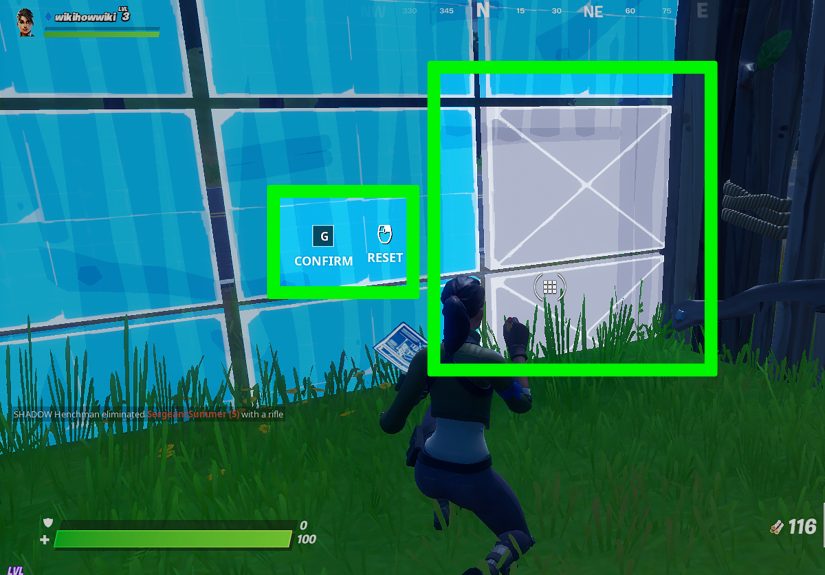
Editing lets you reshape your built structureswalls, floors, ramps, and cones/roofsby selecting tiles on
a grid and confirming the change. That’s how you create windows, openings, angled pieces, and quick escape routes.
You can also reset an edited build back to its original full piece.
The goal isn’t to do “a million edits per second.” The goal is to edit with purpose:
see safely, move cleanly, and control space.
Easy Ways to Edit Buildings in Fortnite: 9 Steps
Step 1: Warm up in a no-stress practice space (Creative is your best friend)
Editing is muscle memory. Trying to learn it while someone is third-partied, you’re out of mats, and your teammate
is emoting instead of helping… is technically possible, but it’s also how keyboards get “mysteriously” replaced.
Use Creative training maps (often called edit courses) where you run, edit through obstacles, and
repeat patterns until your hands stop negotiating with your brain. You can find “Build/Edit/Aim” training islands
in Discover, and many creators publish practice islands by code.
- Start with a “Build/Edit/Aim” map if you’re new (it mixes basics so you don’t get bored).
- Move to dedicated edit courses once you can consistently open and reset pieces.
- Practice in short bursts (8–12 minutes) so you stay focused instead of zoning out.
Tip: Pick one practice map and stick with it for a week. Consistency beats “map-hopping” every time.
Step 2: Turn on the editing settings that match your skill level (not your ego)
Fortnite has added settings that can make editing feel smoother and more forgivingespecially for newer players.
Two big ones you should know:
-
Auto Confirm Edits: This setting replaced the older “Confirm Edit on Release” option. Depending on
how you set it, it can automatically confirm edits and even resetsso you don’t need as many separate button presses. -
Simple Edit: A simplified editing mode that can reduce mis-edits and help newer players learn the
“why” of edits before the “speed” of edits. (Important: it may not be available in competitive modes.)
How to choose:
- If you mis-edit a lot: consider trying Simple Edit (when available) to build confidence and consistency.
- If you understand edits but feel slow: Auto Confirm Edits can reduce extra confirmation steps.
-
If you’re aiming for competitive play: make sure you can also use standard edits reliably, since
simplified features may be restricted in certain competitive environments.
Step 3: Set up your controls so editing is easy to press (and hard to mess up)
Your edit button should be something you can hit without taking your thumb/fingers off movement
any more than necessary. That’s the whole game: move + edit + shoot, not “choose one.”
On any platform:
- Use a dedicated Edit bind you can hit fast.
- Make sure you can Reset quickly (either via settings or a bind).
- If you’re not using auto-confirm features, make Confirm convenient too.
Controller tip (life-saving):
-
If you can, place Edit on a button you can press without releasing your right stick too much. Back paddles help,
but you can still improve without them by choosing a comfortable layout and practicing. -
If you play on Xbox and have an Elite/Adaptive setup, system-level remapping can help you reach important inputs
more comfortablyespecially if your hands get tired during long sessions.
Don’t chase “pro binds” like they’re magical. Your best binds are the ones you can hit cleanly 100 times in a row.
Speed comes after consistency.
Step 4: Learn the 3-part edit flow (this is the whole mechanic)
Every standard edit is basically three actions:
enter edit mode → select tiles → confirm. Reset is the “undo” that returns the piece to normal.
Useful grid facts (so the shapes make sense):
- Walls use a 3×3 tile grid (9 tiles).
- Floors and cones/roofs are typically a 2×2 grid (4 tiles).
- Ramps use a multi-tile grid that allows half-ramps and direction changes.
Practice this slowly at first:
- Build one wall.
- Enter edit mode.
- Select a simple pattern.
- Confirm.
- Reset back to full wall.
- Repeat until it feels boring. (Boring = automated. Automated = good.)
Step 5: Master three “money edits” (the ones you’ll actually use in fights)
You don’t need 27 wall edits on day one. You need three that solve real problems: seeing, peeking, and escaping.
1) The center-window edit (simple vision, safer info)
On a wall, editing out the center tile creates a quick window. Use it to check where an opponent is,
tag them, or just gather infothen reset the wall to close it again.
2) The corner opening (a safer right-hand peek tool)
Removing a corner section of a wall gives you a cleaner angle than a full window in many situations.
It’s commonly used for peeks because you can position your character to expose less of your body while still seeing.
3) The “get-me-out” edit (panic-proof escape)
When you’re boxed and pressured, the best edit is the one you can do under stress. Practice one consistent escape
pattern (like a quick opening on the side you’re already moving toward) so you don’t freeze deciding between options.
Golden rule: edit with a plan. If you open a wall, know whether you’re peeking, leaving, or baiting
a shot. Random edits are just self-made jump scares.
Step 6: Make “edit → shoot → reset” your default habit
The difference between “cool edit” and “free elimination for the other guy” is usually the reset.
Leaving an opening is basically inviting your opponent to send a thank-you note… made of pellets.
Drill this:
- Edit a peek.
- Aim your shot (don’t panic-fire).
- Shoot once.
- Reset immediately.
- Reposition.
If you’re using Auto Confirm Edits in a mode that supports automatic resets, this can feel much smootherbecause the
game reduces the number of manual steps. If you’re not using auto-reset features, bind Reset somewhere comfortable
and grind it until it becomes reflex.
Step 7: Edit with your crosshair placement (your aim shouldn’t wander on vacation)
A huge “secret” to faster edits is not actually speedit’s efficiency. If your crosshair is always
hunting for tiles, you’ll feel slow forever.
Try this:
- Stand at a consistent distance from the wall (not face-pressed).
- Keep your crosshair near the tiles you intend to edit before you even enter edit mode.
- Don’t over-swing your aim. Small movements are easier to repeat.
In real fights, good crosshair placement means your edit flows naturally into a shot. Bad crosshair placement means
you edit… then do a dramatic 180° camera spin… then get eliminated mid-spin like a tragic ballerina.
Step 8: Learn two beginner combos that unlock mobility
Once you can edit a wall consistently, you’ll want simple combinations that help you move through your builds quickly.
Keep it beginner-friendly:
Combo A: Wall + ramp (control your space)
- Place a wall for cover.
- Place a ramp behind it to gain height safely.
- Edit the wall (window or corner) to take a peek without fully exposing yourself.
Combo B: Floor + cone (anti-rush and quick transitions)
- Use a floor to stabilize movement.
- Drop a cone to limit an opponent’s options if they’re pushing into your space.
- Edit the floor/cone when you need a clean route forward or an escape.
Don’t worry if “double edits” feel impossible at first. The first goal is clean movement through one edit
without getting stuck. Speed is the sequel, not the opening scene.
Step 9: Follow a simple 10-minute routine (and actually improve)
If you want real progress, you need a repeatable routine that hits the basics:
- 2 minutes: wall window edits + reset (slow and perfect).
- 3 minutes: corner peeks (edit → aim → reset).
- 3 minutes: movement edits (edit an opening and run through cleanly).
- 2 minutes: freestyle: pick two builds and flow between them.
If you want a little structure, use edit courses in Creativethose maps are built specifically for repetition and timing.
Even better: track one metric (like “how many clean edits in a row without mis-editing”) and try to beat it each session.
Common editing mistakes (and how to stop doing them)
Mis-editing under pressure
Fix: slow down and simplify. Use fewer patterns, repeat them more, and consider settings that reduce extra confirmation steps.
Editing without cover
Fix: build first, then edit. If you’re standing in the open trying to do fancy geometry, you’re basically practicing
being a target dummy.
Forgetting the reset
Fix: treat reset like a seatbelt. You don’t wait until the crash to remember it exists.
Trying to learn everything at once
Fix: pick 3 edits, 2 combos, 1 routine. Do that for a week. Then expand.
Controller vs. keyboard: what changes?
The fundamentals are the same: enter edit mode, select, confirm, reset. The difference is how much your thumbs/fingers
must travel to do it.
If you’re on controller
- Prioritize comfort and consistency over “fastest possible binds.”
- Try to keep editing inputs reachable without giving up camera control too often.
- Practice “edit → reset” until it’s automatic.
If you’re on keyboard and mouse
- Keep your edit bind close to movement keys (so you don’t stop moving to edit).
- Focus on clean crosshair movement instead of wild flicks.
- Build a routine that emphasizes accuracy firstspeed follows.
Conclusion: edits are a tool, not a talent
Editing in Fortnite isn’t “you either have it or you don’t.” It’s a learnable skill built from tiny repetitions:
one clean window, one clean reset, one calm peek at a time. Start in Creative, dial in your settings, pick a few
practical edits, and train them until your hands can do them while your brain is busy planning the next move.
Do that, and soon you’ll notice something magical: you’ll stop feeling like you’re fighting the controls… and start
feeling like you’re fighting the other player. Which is kind of the point.
Player Experiences: What Editing Feels Like Once It Clicks (Extra )
Most players don’t remember the exact day they learned to edit. They remember the moment.
The moment when a wall stops being a panic button and becomes a plan.
Early on, editing feels like trying to type a password while riding a roller coaster. You know what you want to do
(make a window, escape the box, take a peek), but your hands are doing interpretive dance instead. You’ll edit the
wrong tile, open the wall on the side facing the enemy, and briefly invent a brand-new strategy called
“standing still and accepting my fate.” Totally normal.
Then you start practicing the same three edits over and over. At first it’s boring. Then it’s less boring. Then,
one day, you’re in a real fight, someone pressures your wall, and you don’t freeze. You edit a quick peek, take one
calm shot, and reset. It’s not flashy. It’s not a montage. But it’s clean. That’s the first “click.”
The second “click” is when editing turns into movement. You stop thinking of edits as shapes and start thinking of
them as doors in a hallway. You’re not “editing a wall,” you’re “creating a route.” You edit through, rotate around,
close behind you, and suddenly you’re the one controlling space. Players often describe this as feeling like they
have more timeeven though the match is just as fast. What changed is that your hands are no longer arguing with
your brain, so you can spend your attention on positioning, timing, and reading the opponent.
You’ll also discover a funny truth: the best editing isn’t always the fastest editing. It’s the editing that
matches your decision-making. When you’re nervous, you might spam edits and create openings you didn’t mean to make.
When you’re calm, you edit once, take the angle, reset, and move. That calm rhythmedit, act, resetfeels like you’re
“driving” the fight instead of being dragged through it.
And yes, you’ll still have embarrassing moments. Everyone does. You’ll go to edit a window and accidentally make a
different shape, or you’ll open a peek and forget to reset, or you’ll confidently edit the wrong wall in a box and
realize you’ve been decorating someone else’s property. The difference is: once you’ve practiced, those mistakes
become rare blips instead of your entire identity.
If you’re learning right now, here’s the most “experienced player” advice you can get: practice the boring stuff.
One map. A short routine. A few edits you actually use. Because when editing finally clicks, it doesn’t just make you
fasterit makes you feel in control. And in Fortnite, control is basically the closest thing we have to magic.