Table of Contents >> Show >> Hide
- Why STEM Projects Hit Different in Middle School
- Plan Backward: What Do You Want Students to Learn (and Prove)?
- Choose the Right STEM Project Type
- The Facilitation Flow That Saves Your Life
- Teamwork That Doesn’t Melt Down by Day Two
- Materials and Space: Manage the Stuff, Protect the Learning
- Keep It Inclusive: More Students Belong When Access Is Designed In
- Assessment Without the Spreadsheet Spiral
- Project Ideas That Work in Real Middle School Classrooms
- 1) Egg or “Lander” Drop Challenge (engineering + data)
- 2) Paper Mars Helicopter Optimization (engineering + measurement)
- 3) Water Filtration System (science + engineering)
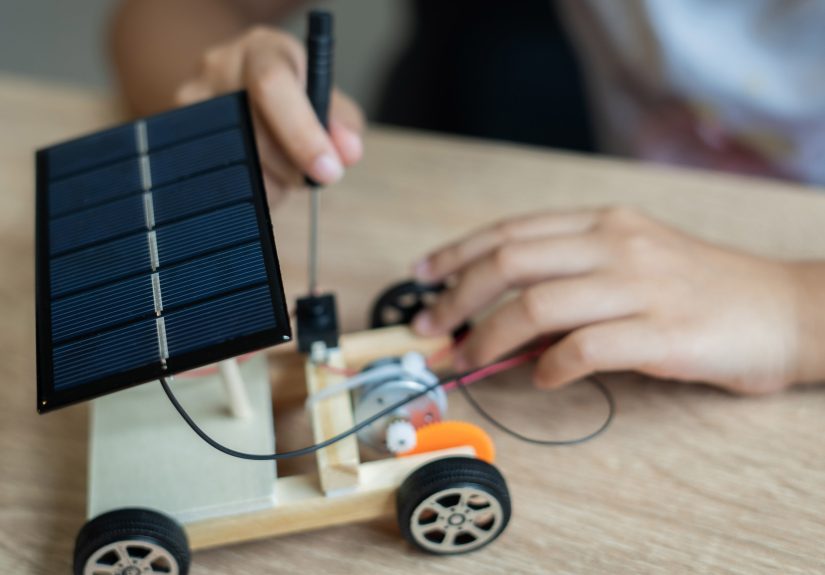
- 4) Solar-Powered Model Solution (energy + design thinking)
- 5) Earthquake-Resistant Structure (forces + iteration)
- 6) Assistive Device Prototype (empathy + engineering)
- 7) Data Investigation: School Energy or Waste Audit (data + communication)
- 8) Coding for a Cause: A Simple Educational Game (CS + content accuracy)
- Troubleshooting: Common Problems and Quick Fixes
- Conclusion: Your Job Is Not to Build the ProjectIt’s to Build the Conditions
- Field Notes: of Real Facilitation Experience (What It Actually Feels Like)
- SEO Tags
Middle school STEM projects are basically a tiny startup accelerator… run by people who are still deciding whether deodorant is a daily suggestion or a hard rule. You’ve got big curiosity, big feelings, and a whole lot of “Waitwhere did the tape go?” energy.
And that’s exactly why STEM projects matter in grades 6–8. When students design, build, test, revise, and present something real, they’re not just “doing science.” They’re learning how to think like problem-solvers, communicate like teammates, and bounce back like humans who have absolutely watched their prototype collapse in slow motion.
This guide breaks down how to facilitate middle school STEM projects without turning into a one-person supply-chain manager or a full-time conflict mediator. You’ll get a practical flow, classroom-tested routines, and specific project ideasplus how to keep it inclusive, aligned to standards, and just structured enough that nobody hot-glues their sleeve to a chair (again).
Why STEM Projects Hit Different in Middle School
Middle school is the sweet spot where students can handle real constraints (time, materials, trade-offs) but still have that fearless imagination adults pay consultants to “rediscover.” STEM projects give them a role beyond “student”: engineer, designer, coder, tester, analyst, presenter. That identity shift is powerful.
Well-facilitated projects also build classroom belonging. Collaboration becomes more than “group work”; it becomes “we are building something that works because we figured it out together.” When you structure participationroles, reflection, predictable routinesmore students can contribute meaningfully, including learners who might not shine in lecture-heavy settings.
Plan Backward: What Do You Want Students to Learn (and Prove)?
Before you pick the coolest project on the internet, decide what success looks like. In middle school STEM, you’re usually aiming for a blend of:
- Core concepts (forces, energy, ecosystems, circuits, data patterns, algorithms)
- Practices (investigating, modeling, analyzing data, designing solutions, arguing from evidence, communicating)
- Success skills (teamwork, planning, perseverance, iteration, presentation)
A helpful way to plan is to write a “success statement” students can understand: “By the end, you can explain your design choices using evidence from tests, and you can show how your solution improved over time.” That one sentence quietly covers content, process, and communication.
Use Gold-Standard PBL elements (without making it complicated)
Great STEM projects borrow heavily from strong project-based learning: a meaningful problem, sustained inquiry, student voice and choice, critique and revision, and a public product. Translation: students should care, investigate, decide, improve, and share.
Choose the Right STEM Project Type
Not all STEM projects are created equaland that’s good news, because you can match projects to your time, space, and sanity.
1) Engineering design challenges
Best for: teamwork, iteration, constraints, “fail forward” culture. Students build a solution that meets criteria within limitations (cost, size, time, materials).
2) Investigation + data projects
Best for: experimental design, measurement, analysis, and evidence-based claims. Students collect data, look for patterns, and communicate findings.
3) Computational making (coding, physical computing, digital design)
Best for: logic, systems thinking, debugging, and creativity. Students build a game, simulation, app prototype, or sensor-based system.
Your best middle school projects usually include at least two of the three: design + data, or coding + design, or data + coding. That mix helps students see STEM as connected, not a set of isolated “subjects that live in different hallways.”
The Facilitation Flow That Saves Your Life
Here’s a predictable five-phase flow you can reuse all year. Reuse is not laziness; it’s a classroom management strategy disguised as a teaching philosophy.
Phase 1: Launch with a problem worth solving
Start with a scenario, not a worksheet. Use a short story, local context, photo set, map, mini-news clip, or a “client request.” Then give students an essential question: “How might we…?” or “What would it take to…?”
Example prompts that work for grades 6–8:
- How might we design a device that protects a fragile item during a drop?
- How can we reduce energy loss in a model home?
- How might we filter dirty water using only simple materials?
- How can we build a game that teaches a science concept accurately?
Facilitator move: Collect “Need to Know” questions on the board. Students are more invested when they see their own questions driving the work.
Phase 2: Define criteria, constraints, and success
Middle schoolers love boundaries when you call them “constraints.” Make success measurable: height, distance, time, mass, brightness, cost, accuracy, number of user tests, or error rate.
Use a one-page “Design Brief” students keep in their project folder:
- Problem: What are we trying to solve?
- Users: Who benefits?
- Criteria: What must it do?
- Constraints: What limits do we have?
- Evidence: What data will prove it works?
Phase 3: Research + mini-lessons in tiny, snack-size bursts
“Research” does not have to mean 40 minutes of wandering the internet like a lost mall shopper. Instead:
- Give 2–4 curated resources (short articles, diagrams, simple datasets, a video clip).
- Teach one key concept at a time (10 minutes max), then send them back to apply it.
- Use sentence starters for evidence and reasoning: “We predict ___ because ___.”
If you’re doing circuits, teach only what they need today (polarity, series vs. parallel, troubleshooting). If you’re doing bridges, focus on forces, load paths, and stable shapes. Keep it immediately usefullike STEM just-in-time training.
Phase 4: Build, test, iterate (the heart of STEM)
Iteration is where the learning lives. But you have to set it up so “iteration” doesn’t become “we broke it once and then stared at it sadly.”
Use short build cycles with built-in testing checkpoints:
- Plan: Sketch or storyboard (no sketch, no supplies).
- Build: Prototype with cheap materials first.
- Test: Measure something. Record results.
- Improve: Change one variable. Test again.
Facilitator move: Require a “change log” (two sentences is enough): what failed, what changed, and why. This turns chaos into evidence and helps students see mistakes as data.
Phase 5: Share publicly (even if “public” is the class next door)
Sharing is not a cute add-on. It raises quality, builds communication skills, and makes students feel like their work matters.
Offer presentation choices:
- Live demo
- Poster + short talk
- Recorded walkthrough
- Photo journal with captions
- Mini “expo” stations
Provide sentence starters for nervous presenters: “Our solution works because…” and “The data shows…” and “If we had more time, we would…”
Teamwork That Doesn’t Melt Down by Day Two
Middle school group work can be magical… or it can look like four people silently watching one kid do everything while someone else rotates in their chair like it’s a competitive sport.
Fix it with visible roles and short, repeatable routines.
Use rolesbut rotate them
- Project Manager: keeps time, runs check-ins
- Materials Manager: handles supply requests and cleanup
- Lead Builder: coordinates construction (not “does everything”)
- Data Analyst: records test results, graphs, patterns
- Communicator: documents decisions and prepares the share-out
Rotate roles every work session or every phase. Rotation prevents identity-locking (“I’m bad at building”) and keeps one student from becoming the unpaid CEO of Hot Glue, Inc.
Run a 3-minute daily “stand-up”
Borrow a routine from engineering teams: What did we do last time? What will we do today? What’s blocking us? It keeps groups accountable and gives you fast insight into who’s stuck.
Materials and Space: Manage the Stuff, Protect the Learning
STEM projects live or die on logistics. When materials are chaotic, student thinking becomes chaotic. A few systems go a long way:
- Supply bins by category (adhesives, connectors, measurement tools, electronics, recyclables).
- Checkout cards for specialty items (multimeters, scissors, hobby knives, sensors).
- “No sketch, no supplies” rule to reduce random-building spirals.
- Cleanup music + checklist so you’re not narrating every piece of trash.
Safety is not optional (and it’s not just goggles)
If you’re using tools, heat, chemicals, or crowded makerspace setups, you need standard operating procedures and clear expectations: how to carry tools, where to cut, what PPE is required, how to handle spills, what to do if something breaks. Post the procedures. Practice them. Make them boringly consistentbecause boring safety is the best kind.
Keep It Inclusive: More Students Belong When Access Is Designed In
A great STEM project doesn’t rely on one “right” way to participate. Build in options so more learners can engage and show what they know:
- Multiple ways to contribute: building, testing, documenting, presenting, organizing, coding.
- Multiple ways to show learning: video, diagram, model, written reflection, oral explanation.
- Sensory-aware choices: predictable routines, quiet corners, noise management, brief movement breaks.
- Language supports: word banks, sentence starters, visuals, and “talk moves” for discussion.
Student voice and choice matters here, too. Let teams choose materials (within constraints), presentation formats, or which variable to optimize. Choice increases motivationand motivation makes your job 43% easier. (That number is not peer-reviewed, but it feels true in the educator soul.)
Assessment Without the Spreadsheet Spiral
The secret to assessing STEM projects is to grade the process as much as the product. Otherwise, the “best” grade goes to the team that already knew how to build a perfect catapult from watching five seasons of YouTube.
Use a simple rubric with four categories
- Problem Definition: clear criteria/constraints, thoughtful plan
- Testing + Data: measurable tests, organized evidence, iteration
- Design Quality: solution meets criteria, improvements justified
- Communication: explanation, reflection, and presentation clarity
Add one category for collaboration if that’s a key goal. And keep performance levels short and observable (“uses data to justify changes” beats “demonstrates excellence” every time).
Build in formative checkpoints
Instead of grading everything at the end, grade a few quick checkpoints: design brief, first test results, change log, and final explanation. This spreads out feedback, reduces last-minute panic, and helps students improve while it still matters.
Project Ideas That Work in Real Middle School Classrooms
Here are STEM project formats with a high success-to-chaos ratio:
1) Egg or “Lander” Drop Challenge (engineering + data)
Students design a lander that protects a fragile payload. They run multiple drops, record impact outcomes, and iterate. Easy materials, strong iteration story.
2) Paper Mars Helicopter Optimization (engineering + measurement)
Students build a simple rotorcraft and optimize flight time and stability by changing blade length, mass distribution, or drop heightthen graph results.
3) Water Filtration System (science + engineering)
Students test filtration media, measure clarity (qualitative + quantitative), and design a system that balances effectiveness with flow rate.
4) Solar-Powered Model Solution (energy + design thinking)
Students build a small solar-powered model (lighting an LED, powering a simple device) and justify design decisions tied to community needs, efficiency, and constraints.
5) Earthquake-Resistant Structure (forces + iteration)
Students build structures using limited materials and test them on a shake table (even a DIY version). They track failure points and reinforce design using evidence.
6) Assistive Device Prototype (empathy + engineering)
Students design a tool to help someone complete a task (opening containers, picking up objects, stabilizing a pencil). Great for inclusion, user testing, and reflection.
7) Data Investigation: School Energy or Waste Audit (data + communication)
Students collect data (waste categories, lighting use, water flow estimates), analyze patterns, then propose evidence-based improvements. “Public product” can be a pitch to school staff.
8) Coding for a Cause: A Simple Educational Game (CS + content accuracy)
Students build a short game or simulation that teaches a science concept. Assessment focuses on debugging, user feedback, and accuracy of the underlying science.
Troubleshooting: Common Problems and Quick Fixes
“They won’t stop arguing.”
Give teams a conflict protocol: 1) restate the goal, 2) list options, 3) test two ideas quickly, 4) decide using evidence. Also rotate rolesmany conflicts are actually “power struggles wearing a lab coat.”
“They keep building without thinking.”
Enforce the design brief and a sketch requirement. Add a “one change per test” rule so iteration becomes scientific, not random.
“One student is doing everything.”
Use role rotation and require each student to submit one artifact: a data table, a sketch, a reflection, or a short explanation. Participation becomes visible.
“They’re afraid to fail.”
Normalize prototypes: label early builds as Version 1.0. Celebrate a “best redesign” award. Make iteration part of the rubric so improvement is rewarded, not punished.
Conclusion: Your Job Is Not to Build the ProjectIt’s to Build the Conditions
Facilitating middle school STEM projects is less like delivering a lesson and more like running a well-designed environment: clear goals, consistent routines, meaningful constraints, and lots of opportunities for students to test, revise, and explain their thinking.
When you use a predictable project flow, teach teamwork explicitly, manage materials with simple systems, and assess the process (not just the final “thing”), STEM projects become energizing instead of exhausting. Students learn that real problem-solving is iterative, collaborative, and evidence-basedand they start seeing themselves as people who can figure things out.
Field Notes: of Real Facilitation Experience (What It Actually Feels Like)
The first time I facilitated a middle school design challenge, I made the classic rookie move: I brought out all the supplies at once. Within minutes, my classroom looked like a craft store exploded. Tape was currency. Cardboard became a fashion accessory. One group built something that resembled a modern art sculpture titled “We Don’t Know What the Criteria Are, But We’re Confident.”
The turning point wasn’t a stricter voice or a longer slideshow. It was structuretiny pieces of structure, delivered like a calm adult in a storm of pipe cleaners. I started using a “design brief first” rule and suddenly students had to slow down long enough to think. It didn’t kill creativity; it protected it. Instead of building randomly, teams began building on purpose.
I also learned that middle schoolers don’t automatically know how to collaborate. They know how to sit near each other. That’s not the same thing. When I introduced rotating roles, some students acted like I’d asked them to trade personalities. But within two sessions, roles reduced conflict because expectations were clear. The quiet student became an outstanding data analyst. The energetic student who couldn’t sit still became the best tester (because testing involves moving, measuring, resetting, repeating). It was like watching kids find new ways to be “smart” that weren’t limited to raising a hand.
The biggest surprise? How much students needed permission to iterate. Many kids think school is about getting it right the first time. So when a prototype fails, they take it personally. I started celebrating redesigns out loud: “This is what engineers do.” We used quick reflection slips: What failed? What did you change? What happened next? Those slips turned frustration into a story of improvement. And once a few groups saw that “failure” could lead to a better version, the room’s whole energy shifted. Students began asking for more test trialslike iteration was a game they wanted to win.
My favorite moment is always the share-out. Not because every project is flawless (it won’t be), but because students can explain the thinking behind their decisions. A team might say, “Our structure didn’t survive the first test, so we reinforced the base after we noticed the wobble.” That sentence is basically the STEM dream: observe, analyze, redesign, communicate. And when the class applauds a working solutionespecially for students who don’t usually get applause in schoolyou can see that STEM projects aren’t only about content. They’re about confidence. That’s the secret payoff of facilitating well: you’re not just teaching science and engineering; you’re helping students practice becoming capable.