Table of Contents >> Show >> Hide
- Why a Button Matters in the Age of “AI Does Everything”
- The Clever Trick: Highlight While You Record
- How Modern AI Recorders Work (Without the Marketing Confetti)
- Examples of the “Clever Button” in the Wild
- Where This Actually Helps: Real Use Cases
- Privacy, Consent, and Not Being “That Person”
- Is a Dedicated AI Recorder Better Than Your Phone?
- Buying Checklist: What to Look For in an AI Voice Recorder
- The Bigger Trend: From Recorders to Searchable Memory
- Conclusion
- of Experiences: What the Clever Button Feels Like in Real Life
You know the moment: the meeting is rolling, someone casually drops the decision, and your brain immediately
switches from “active listening” to “human stenographer.” You scribble. You miss the next sentence. You look up just
in time to hear, “Coolso we’ll do that by Friday,” and everyone nods like it’s totally normal to assign deadlines
at the speed of espresso.
AI voice recorders exist because modern work loves two things: talking and pretending we remember what we said. But
the newest wave of AI recorders isn’t just “hit record, get a transcript.” The clever part is a simple physical
button that lets you tell the AI, in real time, “This part matters.” One press
creates a highlight markerlike dropping a digital sticky note directly onto the conversationso summaries and action
items don’t feel like they were written by a well-meaning alien who only half understood your project.
Why a Button Matters in the Age of “AI Does Everything”
On paper, recording apps already do a lot: capture audio, transcribe speech, even generate bullet-point summaries.
So why would anyone want a separate deviceespecially one that lives in your pocket, clings to your phone, or clips
onto your shirt like a tiny badge of productivity?
Because phones are chaotic. They’re also socially complicated. Pulling out your phone to record can look like you’re
texting, doomscrolling, or auditioning for a spy movie. A dedicated recorder is boring in the best way: it has one job.
And a physical button is the simplest interface humans have ever invented. Press = “do the thing.” No screen taps.
No “Where did the app go?” No accidental switching to selfie mode (which has ended more serious moments than we’d like
to admit).
Apps are greatuntil they aren’t
Apps depend on battery, permissions, audio routing, Bluetooth behaving, and the general mood of your operating system.
Dedicated AI recorders aim to remove friction: faster start, clearer indication that recording is happening, and less
fumbling when the conversation suddenly gets important.
The real enemy is not missing wordsit’s missing meaning
A transcript is only step one. The real value is: decisions, next steps, names, dates, and the one sentence your boss
will ask about next week. That’s where the “clever button” earns its keep.
The Clever Trick: Highlight While You Record
The smartest versions of this button don’t just start or stop recording. They create real-time highlight markers.
Think of it like bookmarking a moment in a podcastexcept you’re bookmarking your actual life, which is somehow both
more useful and slightly terrifying.
Here’s what happens with a highlight press:
- A timestamp is saved at that exact moment in the audio.
- The AI is “nudged” to treat that segment as high priority during summarization.
- Your future self wins because you can jump straight to the good parts without scrubbing through an hour of “quick updates.”
Human-in-the-loop, but make it effortless
AI is great at patterns. Humans are great at context. A highlight button is a tiny handshake between the two:
you provide intent (“that decision matters”), and the AI uses that intent to shape output (summary, action items,
key quotes, follow-up email drafts, study notes, and more).
In other words: instead of the AI guessing what mattered, you tell itwithout interrupting the conversation.
That’s a big deal. It’s the difference between a summary that’s technically accurate and a summary that’s actually
useful.
It’s like adding markers in audio editingwithout being an audio editor
Pro audio tools have had “markers” forever. The new twist is pairing that marker idea with AI so the highlight doesn’t
just help you navigate audioit helps the AI build better notes. One press becomes a signal: “Prioritize this when you
generate the final output.”
How Modern AI Recorders Work (Without the Marketing Confetti)
Most AI recorders follow the same basic pipeline:
- Capture audio via microphones designed for spoken voice (often multiple mics for direction and clarity).
- Clean it up with noise reduction and voice enhancement.
- Transcribe speech-to-text (sometimes in many languages, sometimes with speaker separation).
- Summarize the transcript into structured notes: key points, decisions, action items, and next steps.
- Organize and search the content so you can find it laterby keyword, topic, person, or question.
On-device vs. cloud processing: why you should care
Some products emphasize on-device processing and encryption; others rely heavily on cloud AI. In real life, it’s often
a hybrid: the device captures audio reliably, then an app sends it to AI services to transcribe and summarize.
What matters to you is transparency: where does your audio go, how long is it stored, and what controls do you have?
Speaker labels and “meeting brain” templates
Many AI note systems try to identify different speakers and format results into familiar structureslike meeting minutes,
interview Q&A, lecture outlines, or brainstorming summaries. This is why the output can feel less like a raw transcript
dump and more like a document you’d actually send to someone without apologizing first.
Examples of the “Clever Button” in the Wild
The highlight concept shows up in a couple of practical designs:
Press-to-highlight
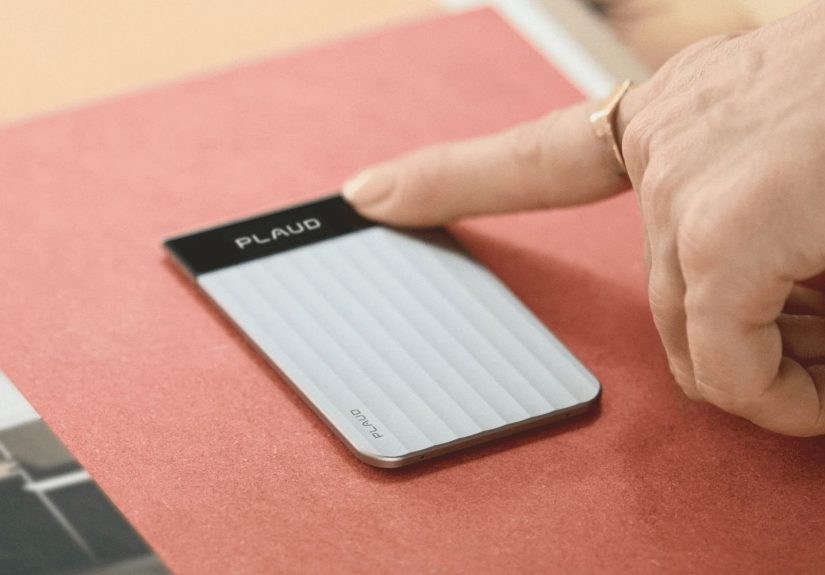
Some slim, card-sized recorders include a dedicated “press to highlight” action while recording. You press once and the
device marks that moment, so later the AI can focus summaries around those flagged points. It’s the productivity version
of pointing at the whiteboard and saying, “This. This is the part we’re not allowed to forget.”
Double-tap highlighting
Other compact recorders use a tap/double-tap system: tap to record, double-tap to mark a key moment. That’s clever for
wearable designs because you can do it discreetlyno screen, no fiddly controls, no “hang on, let me unlock my phone.”
Where This Actually Helps: Real Use Cases
1) Meetings that generate decisions (and also anxiety)
In a fast meeting, highlights let you mark:
- Final decisions (“We’re going with Option B.”)
- Owners (“Alex will handle onboarding.”)
- Deadlines (“Ship by Friday, QA by Wednesday.”)
- Constraints (“Legal needs this language approved.”)
Later, your summary can reliably surface those points instead of spending half its word count on polite filler like
“The team discussed multiple options.”
2) Interviews and journalism-style note taking
If you’re capturing an interviewformal or informalhighlights are perfect for:
memorable quotes, statistics, names/titles, and “follow up on this” moments. Instead of writing “IMPORTANT!!!” in your
notebook 37 times, you press once and keep the conversation natural.
3) Lectures and training sessions
Students (and anyone forced into compliance training) can highlight:
definitions, exam hints, frameworks, and examples. The AI can then generate a study outline that’s shaped by what you
flagged, not just what the speaker said the most often.
4) Phone calls that you don’t want to relive twice
Client calls, customer support escalations, vendor negotiationsthese are full of small details that matter later.
A highlight button lets you mark the precise moment someone agrees to a term or clarifies a requirement, so you can
find it instantly when you write the recap.
Privacy, Consent, and Not Being “That Person”
Recording is powerful. It’s also sensitive. In the U.S., consent rules vary by state, and some situations require
everyone’s permission. Even when it’s legal, it may still be a trust issue if you do it quietly. The best habit is
simple: be transparent.
A practical, non-awkward script
Try: “Mind if I record so I can generate accurate notes and action items?” It frames the purpose as helpful, not sneaky.
In most professional settings, people appreciate the clarityespecially if you share the notes afterward.
Data hygiene matters
Before you use any AI recorder for work, ask:
- Can I delete audio and transcripts permanently?
- Is content encrypted in storage and in transit?
- Do I control sharing and exports?
- Does the company use recordings to train models by default?
- Can I keep sensitive meetings off the cloud?
The “clever button” should help you remember decisionsnot create new ones with legal.
Is a Dedicated AI Recorder Better Than Your Phone?
Sometimes yes. Sometimes no. The honest answer depends on your day.
Dedicated recorder wins if…
- You record frequently (meetings, interviews, classes) and want consistency.
- You need quick, tactile controlsespecially highlightingwithout screen interaction.
- You want a device that feels clearly “work mode,” not “I’m on my phone again.”
- You need better placement options (clip, lanyard, phone attachment) for cleaner audio.
Your phone wins if…
- You only record occasionally and don’t want another gadget to charge.
- Your phone’s built-in transcription features already meet your needs.
- You don’t want subscriptions for transcription minutes and AI summaries.
The dedicated-device argument gets strongest when the recorder’s button-based workflow saves you effort every single time.
“Press to record” and “press to highlight” sounds smalluntil it becomes muscle memory.
Buying Checklist: What to Look For in an AI Voice Recorder
1) Highlight controls that fit your style
If the highlight feature is the star, make sure it’s easy and obvious:
a reliable press, tap, or double-tap that gives you feedback (light, haptic cue, or on-device indicator).
You should never wonder, “Did it actually mark that moment?”
2) Microphone setup and real-world pickup range
More microphones can help with directionality and clarity, especially across a table. But “range” claims can be optimistic
in noisy rooms. If your typical environment is coffee shops, open offices, or classrooms, prioritize clear voice capture
over flashy specs.
3) Battery life that matches your schedule
If you’re recording all day, battery is everything. Some devices offer an “endurance” mode to stretch continuous recording,
often by dialing back pickup range or processing intensity. That tradeoff can be worth it if you’re mostly capturing
nearby voices.
4) Storage and transfer options
Look for enough onboard storage and flexible transfer: app sync, Wi-Fi, Bluetooth, or wired export. The best systems
make it easy to pull the audio and transcript into your workflow (docs, project tools, or a searchable archive).
5) Subscription reality check
Many AI recorders include limited transcription minutes and put the “good stuff” behind a plan. That isn’t automatically
badAI processing costs moneybut you should do the math. If you record hours per week, the subscription is effectively
part of the product price.
The Bigger Trend: From Recorders to Searchable Memory
The highlight button is a clue about where all of this is going. AI recorders are shifting from “audio capture tools”
to “memory systems.” Some products aim for passive, always-on capture; others keep a deliberate, press-to-record approach
for privacy and control. Either way, the goal is the same: turn spoken life into something you can retrieve, query,
and act on.
And the funny thing is, the most futuristic part of these gadgets isn’t the AI model behind the scenes. It’s the tiny,
human-friendly button that says: “Hey, computerpay attention right here.”
Conclusion
A great AI recorder doesn’t just remember what was saidit helps you remember what mattered. The clever button is a
deceptively simple design upgrade that makes AI summaries sharper, action items more accurate, and follow-ups less
stressful. Press once to highlight the moment, and you’ve basically given your future self a shortcut through the chaos.
That’s not just smart. That’s merciful.
of Experiences: What the Clever Button Feels Like in Real Life
Imagine you’re in a weekly team meeting where half the agenda is “quick wins” and the other half is “we should circle back.”
The conversation is fineuntil someone says, “Okay, decision time.” In the past, that phrase would trigger a small panic:
you’d scramble for your notes, open your laptop, or try to type on your phone while maintaining eye contact like a polite
multitasker. With a highlight button, the feeling is different. You press oncequietlyand keep listening. It’s a tiny action,
but it changes your posture. You stay present because you don’t have to chase the moment; you’ve already tagged it.
Or picture a client call where requirements arrive in a flood: feature requests, constraints, budget hints, a random
“oh by the way” that’s actually the most important thing. The clever button becomes your calm anchor. When the client says,
“The must-have is X,” press. When they clarify the timeline, press. When they mention a key stakeholder who needs to approve,
press. Later, when you generate notes, the summary doesn’t feel like a generic recap. It feels like the call’s spine:
what matters, in order, with fewer missing pieces.
For students, the experience is oddly empowering. During lectures, you don’t have to choose between writing everything down
and understanding what’s being taught. The highlight press becomes a way to mark “testable” moments: definitions, a professor’s
“this is important,” a worked example, the one diagram everyone photographs. Later, the AI-generated outline can mirror your
priorities, producing study material that’s closer to how you actually learnless noise, more signal.
Interviews bring another kind of relief. If you’ve ever recorded someone and then hunted for the exact quote that made you
sit up straight, you know the pain of scrubbing audio like you’re trying to find a specific raindrop in a storm. A highlight
button turns that hunt into a hop. You flag the great quote in the moment, and later you jump straight to it. It feels almost
like time travelexcept instead of fixing mistakes, you’re saving yourself from future frustration.
The best part is psychological: the button makes you more confident that you won’t miss something critical. That confidence
changes how you show up. You listen better. You ask better follow-up questions. You’re less tempted to interrupt with “sorry,
can you repeat that?” because you’re not desperately trying to capture every syllable. The clever button doesn’t just improve
the AI’s outputit improves your experience of the conversation itself.