Table of Contents >> Show >> Hide
- Why CP/M Was a Big Deal (and Why 6502 Folks Care)
- CP/M Anatomy You Can Steal: CCP, BDOS, BIOS
- Why a Stock 6502 Doesn’t Just Run CP/M
- What “CP/M 6502-Style” Means in Practice
- Design Choices That Make or Break the Illusion
- Examples From the Wild: CP/M Ideas on 6502 Hardware
- Quick Start Roadmap: Build Your Own
- Hands-On Experiences: What It Feels Like to Go “CP/M 6502-Style”
- Conclusion
CP/M is the operating system equivalent of a diner coffee mug: chipped, classic, and somehow still the right tool for the job. In the late 1970s and early 1980s it became the “software bus” for 8080- and Z80-based microcomputersone command line, one file model, and a huge shared library of programs. Meanwhile, 6502 machines (Apple II, Commodore, Atari, BBC Micro, and friends) were busy being brilliant… and also busy being incompatible with each other.
So what happens when you love the 6502’s elegant minimalism but also crave CP/M’s tidy, portable world? You build (or run) CP/M 6502-style: a CP/M-like environment that keeps the spiritCCP/BDOS/BIOS layering, simple executables, predictable system calls, and a no-nonsense CLIwhile speaking fluent 6502.
Why CP/M Was a Big Deal (and Why 6502 Folks Care)
CP/M’s superpower was portability. Programs targeted a stable OS interface instead of a specific disk controller, terminal, or vendor quirk. That created a shared ecosystem of tools and applications that could move between machines with relatively little drama.
The 6502 world didn’t get one dominant cross-vendor OS standard. You got great computers, but also a dozen different DOSes, formats, and conventions. “CP/M 6502-style” is a practical “what if”: what if 6502 systems had a common software contractso your editor, assembler, and file utilities could travel with you?
CP/M Anatomy You Can Steal: CCP, BDOS, BIOS
- CCP (Console Command Processor): the shellparses commands and loads programs.
- BDOS (Basic Disk Operating System): the services layerfiles, devices, and system calls for apps.
- BIOS (Basic Input/Output System): the hardware adapterconsole and disk I/O tuned to each machine.
The layered design is the key lesson. If your 6502 system cleanly separates “hardware plumbing” from “OS services,” your software becomes easier to port, test, and share.
The “System Call Contract” (aka the BDOS Trick)
Classic CP/M programs call into BDOS through a fixed entry point and pass a function number plus a parameter block. The exact register dance depends on CPU and version, but the philosophy is consistent: apps ask the OS for services instead of grabbing hardware by the lapels.
A Concrete Example: “Print This String”
In CP/M-80, a classic beginner-friendly BDOS call is “print a string.” A program loads the address of a $-terminated string into the expected parameter register pair, sets the function number, and calls the BDOS entry. It’s charmingly primitive, but it shows the pattern: function number + pointer + single doorway into the OS.
On a 6502-style system, you can keep the pattern while modernizing the details. For example, you might decide that function $09 prints a zero-terminated string, with the pointer stored in a zero-page pair. Apps then become delightfully portable across any machine that implements your BDOS table:
The best part: once you’ve frozen this contract, you can rewrite your BIOS for a new display or serial interface without touching the apps. That’s the CP/M magic, translated into 6502 grammar.
FCBs, Records, and the 8.3 Habit
Classic CP/M file handling often revolves around a File Control Block (FCB)a fixed-size structure in memory that describes a file name, drive, and state for sequential or random record access. Many CP/M tools also think in 128-byte logical records (even if the underlying disk sectors are a different size), which simplifies buffering and makes file I/O consistent across hardware.
You don’t have to copy that model perfectly, but borrowing the shape can be useful. An FCB-like structure is easy to pass to BDOS calls, easy to document, and easy to implement in assembly or C. Likewise, keeping a 128-byte “DMA buffer” concept gives utilities a common place to stage reads and writes. And yes, 8.3-ish filenames are limitingbut they also make directory displays compact and command parsing simple, which is exactly why CP/M felt snappy on tiny machines.
Why a Stock 6502 Doesn’t Just Run CP/M
CP/M software expects an Intel 8080-compatible CPU. The 6502 is a different animal: different registers, different calling conventions, and a different memory culture. The 6502’s hardware stack is fixed to page 1 ($0100–$01FF), and the zero page is performance gold, often used as a “fast pointer zone.” That’s fantastic for 6502 codebut it’s not the environment CP/M binaries were written for.
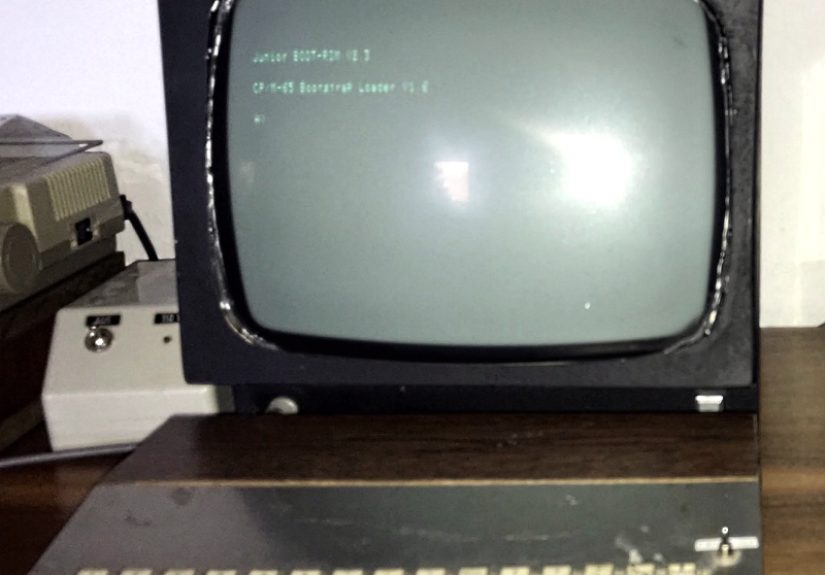
Historically, the solution was simple: add a Z80. Apple II owners used Z80 cards (like Microsoft’s SoftCard) to run CP/M. The Commodore 128 even included a Z80 alongside its 6502-family CPU. CP/M 6502-style flips the approach: keep the 6502, and recreate the CP/M experience natively.
What “CP/M 6502-Style” Means in Practice
A CP/M 6502-style system typically does four things:
- Boots into a CP/M-ish command line with a small set of built-in commands and the ability to run external utilities.
- Exposes a BDOS-like API (a stable system-call interface) for apps.
- Contains a BIOS-like hardware layer so ports mostly change in one place.
- Loads simple executables (often “load to fixed address and jump”), mirroring the spirit of
.COM.
It doesn’t automatically mean you can run unmodified 8080/Z80 CP/M applications. Some projects add emulation or translation, but many focus on the architecture and developer experience rather than strict binary compatibility.
Design Choices That Make or Break the Illusion
Memory: Don’t Let the OS Eat the Party
Many 6502 machines have ROM, memory-mapped I/O, and screen memory squatting in the address space. If your OS lives in the same RAM your programs need, everything gets cramped fast. A popular solution is bank switching or overlay RAM: keep CCP/BDOS/BIOS in a separate bank so the main program area stays large and contiguousvery much in the CP/M spirit of maximizing the transient program area.
Files: Keep the Simplicity, Choose Your Authenticity Level
You can go fully CP/M-like (record-based I/O, directory-style metadata, 8.3-ish names) or CP/M-inspired (keep the user-facing conventions but map them onto something modern like FAT on an SD card). The best choice depends on your goal:
- Authenticity: easier to exchange classic disk images and emulate “real CP/M vibes.”
- Convenience: easier to move files to/from a modern PC without special tools.
System Calls: Replace CALL 0005 with a 6502-Friendly Gate
The calling convention is yours to define, but keep it consistent. A common pattern is:
- Function number in
A(or a fixed zero-page byte) - Parameter pointer in zero page
JSRto a fixedBDOS_ENTRYaddress
Here’s a conceptual contrast:
That “gate” is the portability engine. Once apps agree to speak BDOS, you can swap BIOS implementations without rewriting everything else.
Examples From the Wild: CP/M Ideas on 6502 Hardware
Modern retro projects have explored CP/M-on-6502 in a few ways:
- CP/M-style ports that implement a familiar CCP/BDOS/BIOS structure and use memory tricks like overlays so OS components don’t consume the whole machine.
- CP/M analogues that recreate the shell-and-services model (and often CP/M-ish utilities) for 6502 homebrew computers.
- Discussion and experimentation focused on the real prize: a stable API that encourages portable 8-bit software.
If you’re picking a starting point, look for a project that documents its call interface and hardware layer clearly. The code matters, but the contract matters more.
Quick Start Roadmap: Build Your Own
- BIOS first: console I/O and block read/write. Treat hardware chaos as a “BIOS problem.”
- Minimal BDOS: print/read line, open/read/write/close, directory enumeration.
- CCP + loader: a tiny shell that runs built-ins and loads external programs.
- Ship utilities early:
DIR,TYPE,COPY,REN,ERA. Tools make the OS feel real.
After that, you can iterate: better error handling, wildcards, redirection, a smarter editor, or even an optional 8080/Z80 compatibility layer if you’re feeling adventurous.
Hands-On Experiences: What It Feels Like to Go “CP/M 6502-Style”
Here’s the part nobody puts on the glossy brochure: building a CP/M 6502-style setup is equal parts engineering and emotional growth. The first “experience” is learning that the command line is only 10% commands and 90% expectations. You will type DIR and immediately want it to behave like the CP/M you remember (or like the screenshot you saw online). That means sorting, formatting, drive defaults, error messages, and all the tiny social cues an OS gives its user. The difference between “works” and “feels right” is usually about 400 lines of code and one existential sigh.
Next comes memory. If your machine has bank switching or overlay RAM, you’ll feel like you discovered a secret room in your house. If it doesn’t, you’ll become weirdly fluent in phrases like “transient program area” and “I can spare 96 bytes if I delete my dignity.” Expect to spend time moving buffers, relocating tables, and choosing which features are worth the RAM. You’ll develop strong opinions about whether a line editor should support insert mode or whether that’s just a gateway drug to writing vi on a computer with 64K.
Storage is where you’ll meet your new best friend and worst enemy: the disk image. When you can build a bootable image on a modern machine and run it instantly in an emulator, you’ll feel unstoppable. Then you’ll try real hardware and discover that your “perfect” image fails because of a sector skew assumption, a timing quirk, or a driver that politely interprets your block size as a suggestion. This is when CP/M’s BIOS philosophy pays off. You can keep your BDOS and utilities stable while you swap out the low-level storage routines like different pairs of socks until one stops squeaking.
Debugging system calls is its own rite of passage. In CP/M-land, “call BDOS function X” sounds clean. In reality, it’s “set up registers/pointers, don’t clobber the wrong zero-page bytes, don’t forget the DMA buffer, and absolutely do not return with interrupts in a bad mood.” The first time your TYPE command prints a file correctly, you’ll feel like you invented literacy. The first time it prints your directory as if it were poetry, you’ll learn that you accidentally opened the wrong file handle and the computer is now a performance artist.
And then something clicks: your little system becomes portable. You move it from a homebrew 6502 board to a different 6502 computer (or from emulator to real hardware) by changing the BIOS layer and maybe a couple of memory constants. Your editor still runs. Your assembler still runs. Your file utilities still run. That moment is the true CP/M experiencenot “I can run old software,” but “I can build software that survives new hardware.” It’s shockingly satisfying, like watching a houseplant live through winter.
Finally, there’s the community experience. People will argue about whether your system is “really CP/M” the way car folks argue about what counts as a “real” muscle car. Smile, nod, and keep shipping. CP/M 6502-style isn’t about purity; it’s about stealing good ideas from history and using them to make your 8-bit machine feel like it has a tiny, well-run city inside.
Conclusion
“CP/M 6502-style” is a practical nostalgia project: take the architectural lessons that made CP/M portableCCP/BDOS/BIOS layering, a stable system-call API, and simple program conventionsand apply them to native 6502 systems. You don’t need to bolt on a Z80 to enjoy the CP/M vibe. You need a clear interface contract, a disciplined hardware layer, and a handful of utilities that make your machine feel cohesive. The payoff is a 6502 platform that’s fun to use, fun to build, and surprisingly future-proof (at least by 8-bit standards).