Table of Contents >> Show >> Hide
- Galaxy Tab Active4 Pro at a Glance
- Built Like It’s Allergic to Fragility
- Performance and Battery Life in the Real World
- Samsung DeX: Turning a Rugged Tablet into a Mini PC
- Who Is the Galaxy Tab Active4 Pro For?
- Price, Value, and Buying Tips
- Pros and Cons of the Galaxy Tab Active4 Pro
- Is the Galaxy Tab Active4 Pro Right for You?
- Real-World Experiences with the Galaxy Tab Active4 Pro
If you’ve ever tried to use a sleek glass tablet on a construction site, in a warehouse, or in the back of a delivery truck, you already know: normal tablets are fearless… right up until they meet concrete, dust, or a bucket of soapy water. That’s where the Samsung Galaxy Tab Active4 Pro steps in. It’s a rugged Android work tablet built to survive the real world, not just the conference room.
Whether you’re managing field workers, outfitting a fleet, or just a very clumsy human who drops everything, this guide walks you through everything you need to know about the Galaxy Tab Active4 Profrom specs and durability to DeX productivity tricks and real-world experiences.
Galaxy Tab Active4 Pro at a Glance
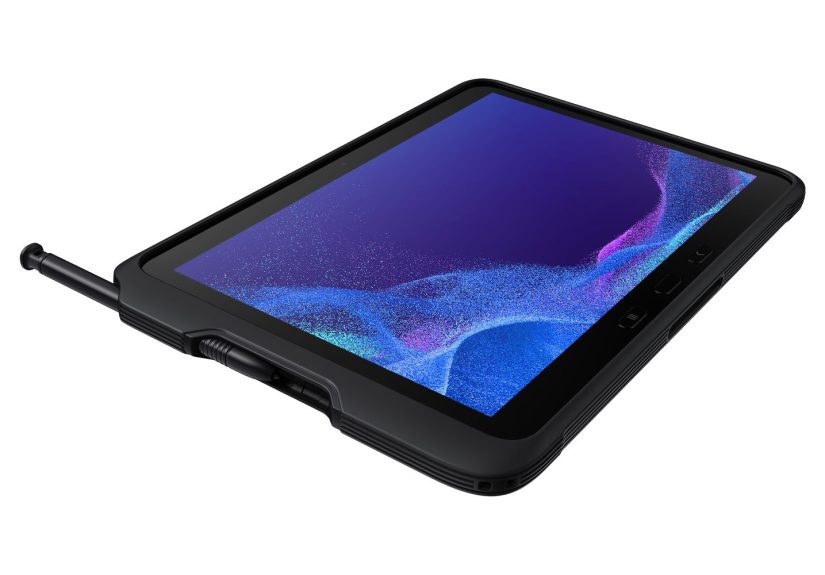
The Galaxy Tab Active4 Pro is a 10.1-inch rugged tablet designed primarily for business, frontline, and industrial environments. Think logistics, construction, healthcare, manufacturing, and public safetyanywhere a regular tablet would be living on borrowed time.
Core Specs and Hardware
- Display: 10.1-inch TFT LCD, WUXGA 1920 × 1200 resolution with 16:10 aspect ratio
- Processor: Qualcomm Snapdragon 778G 5G (SM7325) octa-core chipset
- Memory and Storage: 4 GB or 6 GB of RAM, 64 GB or 128 GB of internal storage
- Expandable Storage: microSD support up to 1 TB
- Battery: 7,600 mAh removable battery, plus support for “No Battery” mode when hard-wired power is used
- Connectivity: Wi-Fi 6, optional 4G/5G models, Bluetooth 5.2, NFC (select models), USB-C, and POGO pins
- Cameras: 13 MP rear camera, 8 MP front camera
- OS at launch: Android 12/12L with Samsung’s One UI (upgradeable over time)
In short: it’s not just a tough shell. Underneath, it has a mid-high tier mobile chipset and modern connectivity that can comfortably handle business apps, remote access tools, and multitasking.
Built Like It’s Allergic to Fragility
Ruggedness is the whole point of the Galaxy Tab Active4 Pro, and Samsung really leaned in.
Durability Ratings: MIL-STD-810H and IP68
The tablet is tested to the MIL-STD-810H standard, which means it’s been put through a range of environmental tests: drops, vibration, humidity, extreme temperatures, and more. With the included protective case, it can withstand a drop of around 1.2 meters (about 4 feet) onto hard surfaces.
It also carries an IP68 rating, which means it’s dust-tight and can survive being submerged in up to 1.5 meters of fresh water for up to 30 minutes when ports and covers are properly sealed. In everyday terms: splashes, rain, dusty job sites, and muddy hands are all fair game.
Gorilla Glass 5 and “Glove Mode”
The display is protected by Corning Gorilla Glass 5, offering improved drop resistance compared with older glass. On top of that, you can crank up touch sensitivity so the screen responds even when you’re wearing gloves or dealing with wet fingerscritical in cold climates, cleanrooms, or food-service environments.
Active Key: Your One-Button Shortcut
On the frame you’ll find a programmable Active Key. You can map it to open your most-used applike a push-to-talk solution, barcode scanning app, work order system, or even a custom in-house tool. It can be set to work even when the screen is off, turning the tablet into something that feels more like a specialized handheld device than a generic consumer tablet.
Performance and Battery Life in the Real World
Specs are nice, but how does it actually feel to use day-to-day?
Snapdragon 778G: Fast Enough for Serious Work
The Snapdragon 778G is a very capable 6 nm chipset that’s used in plenty of midrange and upper-midrange smartphones. It handles business apps, VPN connections, split-screen multitasking, and light to moderate content creation (like photo capture, annotations, or basic video) smoothly.
For most field and enterprise scenariosmobile forms, ERP dashboards, fleet management apps, telehealth, or inventory scanningit’s more than powerful enough. It’s not a gaming monster, but that’s not why anyone is buying a Tab Active4 Pro anyway.
Battery Life: A Full Shift and Then Some
The 7,600 mAh removable battery is designed to get you through a full workday. Independent tests and reviews suggest it can last well over 10 hours of mixed usage, with around 14 hours of Wi-Fi web browsing under moderate brightness in some cases.
The real superpower, though, is the replaceable battery. When power is low, you can just pop in a charged spare instead of tethering workers to chargers. That’s a big win for 24/7 operations and teams working in vehicles or remote sites.
For kiosk or fixed install use cases (like warehouse terminals or hospital stations), you can even run it in a special mode without a battery installed while it’s powered via the POGO pins or USB-Creducing heat and battery wear.
Samsung DeX: Turning a Rugged Tablet into a Mini PC
One of the biggest advantages of choosing a Samsung tablet over many other rugged options is Samsung DeX. DeX transforms the tablet’s interface into a desktop-like environment when connected to an external display, keyboard, and mouse.
What DeX Looks Like in Everyday Use
With DeX enabled, your apps appear in resizable windows on a monitormore like a Windows PC than a phone. You can write reports in a word processor, keep a browser open for research, and monitor messaging tools at the same time.
Common scenarios include:
- A field supervisor comes back from the job site, drops the Tab Active4 Pro into a dock at their desk, and continues their work on a big screen with a keyboard and mouse.
- A healthcare worker uses the tablet on rounds, then plugs into a monitor at a nurse’s station to complete charting and documentation.
- A service technician uses DeX to run remote support sessions or training videos on a larger display at a customer site.
Is it a complete laptop replacement? Not for everyone. But for a lot of mobile-first workers whose main tools are web apps, line-of-business apps, and cloud services, DeX turns the Tab Active4 Pro into a surprisingly capable “2-in-1” system with a built-in rugged shell.
Who Is the Galaxy Tab Active4 Pro For?
This tablet is unapologetically nichein a good way. If you just want to watch Netflix on the couch, you’re paying for durability you don’t need. But in the right environment, it’s a star.
Field and Frontline Work
For technicians, inspectors, and delivery drivers, the Tab Active4 Pro shines. The rugged design means it can ride around in a truck, get used in the rain, or be handled with dirty gloves without needing a baby-sitter. The GPS and 4G/5G options make it ideal for real-time routing, documentation, and proof-of-delivery workflows.
Warehouses, Logistics, and Retail
In warehouses, the programmable Active Key and support for NFC and third-party scanning accessories make it fit naturally into inventory workflows and picking systems. In retail and hospitality, it can act as a mobile POS terminal or self-check kiosk that won’t panic every time someone drops it or spills a drink nearby.
Healthcare and Public Safety
Healthcare workers benefit from a device that can handle frequent disinfection, accidental bumps, and fast-moving environments. Public safety teamslike fire, rescue, or policecan mount the Tab Active4 Pro in vehicles for mapping, dispatch, and reporting while trusting it to survive harsh conditions.
Anyone Who Breaks “Normal” Tablets
If you’ve already shattered a couple of slim consumer tablets and your heart drops each time one slides off a workbench, the Tab Active4 Pro may end up being cheaper in the long run. Fewer repairs, fewer replacements, less downtimethat adds up.
Price, Value, and Buying Tips
Pricing varies depending on configuration (Wi-Fi vs. LTE/5G, RAM and storage options) and where you buy it, but you’ll typically see the Galaxy Tab Active4 Pro positioned as a premium rugged tablet. Expect street prices in the United States to land roughly in the mid-hundreds to around the $800+ range, depending on connectivity and memory.
Before you buy, consider:
- Connectivity: If workers need access in the field without dependable Wi-Fi, invest in LTE/5G models.
- Accessories: Budget for extra batteries, desktop docks, vehicle cradles, rugged cases (if you want extras), and barcode scanners if needed.
- Software: Many organizations pair the tablet with an MDM/EMM solution (like Intune, Knox Manage, or other endpoint management platforms) to lock down apps, deploy updates, and track devices.
- Lifecycle and Updates: The Tab Active4 Pro appears in Android Enterprise Recommended listings and is slated for security support for several years, which is important for long deployments.
If you’re kitting out a whole team, it’s worth talking to a reseller or Samsung’s business channel about enterprise SKUs and bulk pricing, which often include extended support options.
Pros and Cons of the Galaxy Tab Active4 Pro
What It Does Really Well
- Excellent durability: MIL-STD-810H, IP68, Gorilla Glass 5, and the included case make it hard to kill.
- Removable battery: Ideal for shifts, fleet deployments, and remote sites.
- DeX support: Allows a more desktop-like workflow without buying separate laptops for everyone.
- Glove-friendly and wet-touch use: Designed for real-world messy conditions.
- Enterprise-friendly: Plays nicely with Android Enterprise, Samsung Knox, and fleet management tools.
Where It’s Less Ideal
- Bulkier than consumer tablets: It’s not huge, but it’s thicker and heavier than a regular glass-and-aluminum tablet.
- Screen is functional, not flashy: The TFT LCD is fine for work, but not as vibrant as Samsung’s OLED tablets.
- Price premium: You’re paying for rugged features; for pure entertainment use, there are cheaper options.
Is the Galaxy Tab Active4 Pro Right for You?
If your use case involves mud, dust, concrete, vehicles, or frequent disinfection, the answer is very likely yes. The Galaxy Tab Active4 Pro is built to live where normal tablets go to die. It combines serious durability, a swappable battery, and DeX desktop features in one package that can serve as both a mobile device and a light desktop replacement.
On the other hand, if your tablet will mostly live on a couch, in a classroom, or on a clean office desk, you may not need this level of ruggedness. A Galaxy Tab S-series or midrange Android tablet can provide a better display, lighter weight, and a more entertainment-focused experience at a lower price.
For businesses and professionals operating outside the cushy bubble of climate-controlled offices, though, the Galaxy Tab Active4 Pro is one of the most versatile and battle-ready Android tablets you can buy today.
Real-World Experiences with the Galaxy Tab Active4 Pro
Specs tell one story; daily use tells another. Here’s how the Tab Active4 Pro tends to behave once it leaves the spec sheet and hits the job site.
A Day on a Construction Site
Imagine a site supervisor starting the day by grabbing the Tab Active4 Pro from a charging dock. They throw it into a backpack full of tools (no padded sleeve in sight) and head out. At the site, the tablet lives on scaffolding, pickup truck dashboards, and the occasional stack of 2x4s. Dust is everywhere, the weather shifts from chilly drizzle in the morning to bright sun in the afternoon, and everyone is wearing gloves.
With glove mode enabled, the supervisor can pull up drawings, mark up PDFs, and fill out digital checklists without constantly peeling off work gloves. A quick drop from waist height onto concrete is annoying but not catastrophicthe tablet keeps going. At lunch, they use the same tablet to video call the office to walk through an issue in real time, using the rear camera to show exactly what they’re seeing on-site.
Inside a Busy Warehouse
In a warehouse, a fleet of Tab Active4 Pro devices can be mounted on forklifts and carts or carried by hand. Workers scan barcodes with paired scanners or use NFC-enabled workflows for inventory checks. The Active Key might be set to launch the warehouse management app instantly, saving taps and time.
Because the tablets are rugged and easy to wipe down, they can survive collisions, jolts, and the occasional “Oh no, it slid off the pallet.” When one tablet’s battery dips low, a worker just swaps in a spare. No waiting for a charge, no scrambling for outlets in aisles or loading bays.
On the Road with Field Technicians
For technicians who live in their vehicles, the Tab Active4 Pro can act as a navigation device, work-order manager, documentation tool, and portable PC. Mounted in a vehicle dock, it provides maps and job details. At the job site, it comes out of the cradle for photos, customer signatures, and notes.
Back in the officeor even at homethe same tech can connect the tablet to a monitor via DeX to finish detailed reports and email follow-ups. Instead of juggling a laptop and a tablet, they can do most of their work from this single rugged device.
Lessons from Long-Term Use
Teams that deploy the Tab Active4 Pro over months and years typically notice a few things:
- Fewer broken screens and housings: The up-front cost is higher than a basic tablet, but the reduction in breakage and downtime often balances that out.
- Better battery strategy: Replaceable batteries and docks make it easier to keep devices running across multiple shifts.
- Happier IT and operations teams: With rugged gear, IT spends less time processing hardware failures and more time improving workflows.
- Higher user confidence: Workers feel more comfortable using the tablet in tough situations when they know it’s built to handle them.
Of course, no device is perfect. Some users will wish for an OLED display, lighter weight, or an even faster processor. But the whole point of the Galaxy Tab Active4 Pro is not to win a spec-sheet beauty contestit’s to show up, get the job done, and survive to do it again tomorrow. And in that role, it performs extremely well.
If your work lives in demanding environments and you’d like one device that can go from forklift mount to desktop dock without babying, the Galaxy Tab Active4 Pro absolutely earns its place on your shortlist.