Table of Contents >> Show >> Hide
- Why Nixie Tubes and RPN Make Such a Good Pair
- The Core Architecture of a Nixie Tube RPN Calculator
- Why RPN Still Wins Loyal Fans
- Practical Design Challenges Builders Should Respect
- What Makes the Best Nixie Tube RPN Calculator Projects Stand Out
- Extended Experience Notes: What This Kind of Project Feels Like in Real Life
- Conclusion
- SEO Metadata
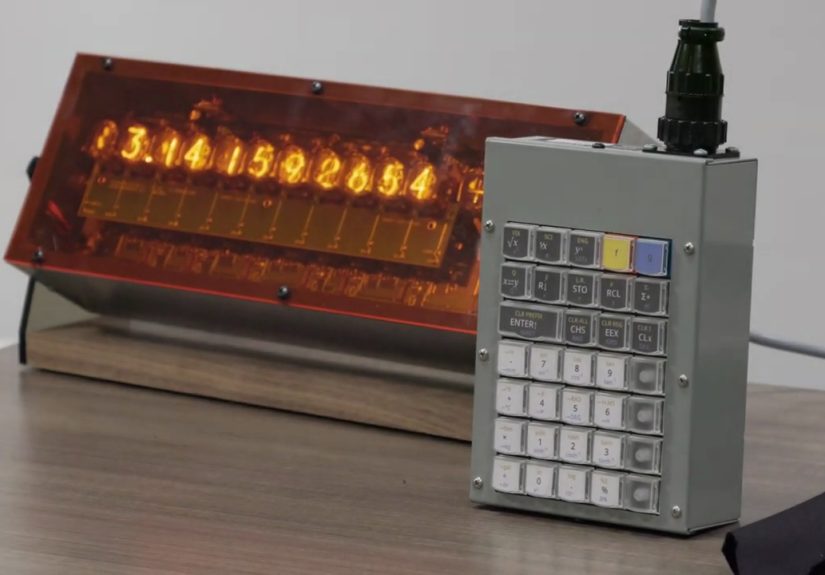
Some projects solve a problem. Others solve a problem while glowing like a tiny orange science-fiction fireplace. A Nixie Tube RPN Calculator Project belongs squarely in the second category. It combines two things that engineers, makers, and retro-tech obsessives have loved for decades: the warm, unmistakable glow of Nixie tubes and the brisk, elegant logic of Reverse Polish Notation (RPN). The result is not just a calculator. It is a conversation piece, a desk sculpture, a computing lesson, and a reminder that old interfaces were not primitive so much as wonderfully opinionated.
That is the real charm of a Nixie calculator project. It is not trying to beat your phone at convenience. Your phone already won that race somewhere around the first app store. Instead, this build wins on experience. It makes arithmetic feel tactile. It makes every keypress feel deliberate. And it turns math into a small theatrical event, which is something Excel has frankly failed to do for years.
Why Nixie Tubes and RPN Make Such a Good Pair
A Nixie tube is one of those technologies that seems impossible the first time you see it. The numeral appears to float inside glass, glowing with that signature neon-orange warmth, as if the number itself has been granted a tiny afterlife. In practical terms, Nixie tubes are gas-discharge displays that require relatively high voltage, which means they bring both beauty and engineering baggage. That second part matters. Every gorgeous retro display comes with a little electrical drama hiding backstage.
RPN, meanwhile, is the logic half of the romance. Instead of typing math the way it appears on paper, you enter numbers first and apply the operator afterward. So instead of pressing 3 + 4 =, you think in a stack and enter 3 4 +. This sounds weird for about ten minutes, mildly annoying for another ten, and then strangely brilliant after that. Once it clicks, RPN reduces clutter, eliminates a lot of parentheses, and makes multi-step calculations feel fast and direct.
Put those two ideas together and you get a project with a very particular personality. The Nixie display gives the machine visual soul. RPN gives it behavioral soul. One glows. One thinks. Together, they make a calculator that feels less like a disposable gadget and more like an instrument.
The Core Architecture of a Nixie Tube RPN Calculator
The Display System
The display is the headline act, so it deserves special treatment. A typical Nixie calculator build may use multiple numeral tubes for the main number display and, in more ambitious versions, an additional indicator tube or symbol display for functions, operators, or mode feedback. That sounds wonderful because it is wonderful, but it also means the builder has to manage digit driving, current limiting, and high-voltage distribution without turning the project into an accidental smoke generator.
Design choices matter here. Some builders favor dedicated driver hardware or shift-register approaches to simplify control. Others use multiplexing to reduce parts count, which is smart until timing, brightness, and ghosting decide to hold a surprise meeting. A good Nixie Tube RPN Calculator Project balances aesthetics with readability. The display must feel alive, but not so alive that digits flicker, bloom unevenly, or look like they are arguing with one another.
The Logic Engine
Under the glass glamor, the calculator still needs a brain. In many modern hobby builds, that means a microcontroller handling key scanning, stack logic, display updates, and function execution. The interesting question is not whether a tiny controller can do calculator math. Of course it can. The interesting question is what kind of calculator personality the firmware is aiming to recreate.
Some projects borrow ideas from classic Hewlett-Packard behavior, especially the four-level stack model associated with early handheld RPN calculators. Others go for a looser interpretation and simply preserve the spirit of postfix input. The best builds take the interface seriously. They do not treat RPN as a novelty sticker slapped onto a pretty box. They make the stack behavior feel coherent, predictable, and satisfying.
The Keyboard and Human Experience
Here is where a lot of projects either become delightful or become a decorative trap. A Nixie calculator with mushy input is like a vintage sports car with a steering wheel made of pudding. It misses the point. The keyboard should reinforce the whole idea of deliberate calculation. Good travel, sensible spacing, and clear labeling matter more than people think.
Mechanical key switches are a popular choice because they add a clean, assertive feel. They also contribute to the retro-lab fantasy, which is half the reason anyone starts this project in the first place. The machine should make you want to calculate something unnecessary, like converting cubic feet to liters just because the keys feel terrific.
Why RPN Still Wins Loyal Fans
RPN has survived for a reason. It works well for real, multi-step calculation. It lets users think in operations rather than punctuation. Once you understand the stack, you stop worrying so much about parentheses and start focusing on what you are actually doing. For engineering-minded users, that can feel liberating.
It also pairs beautifully with limited-display hardware. Early calculator designers appreciated that postfix entry could simplify both keystrokes and hardware logic. In a retro-inspired modern project, that same efficiency still matters. RPN feels native to a purpose-built machine. It does not feel like a compromise. It feels like the machine’s natural language.
And yes, RPN also carries a little swagger. Learning it feels like joining an old club where the members are annoyingly correct about certain things. They may be insufferable for five minutes, but then you borrow the calculator and realize they had a point.
Practical Design Challenges Builders Should Respect
Power Supply and Safety
This is the part where the retro glow stops being cute and starts demanding respect. Nixie tubes need high voltage, so the power section is not a decorative afterthought. It is the grown-up part of the project. Builders usually need a boost supply or other high-voltage solution, plus careful layout, isolation, and sensible enclosure decisions. The project can absolutely be safe, but only if the designer behaves like voltage is real and not a rumor.
A serious build also plans for heat, noise, and serviceability. Nothing ages a beautiful desk device faster than a power stage that whines, runs hot, or requires disassembling half the enclosure to replace one tired component. Retro style is wonderful. Retro maintenance habits are less charming.
Display Control Strategy
Another major decision is whether to drive the tubes directly with more hardware or multiplex them to save complexity and cost. There is no universally perfect answer. Direct approaches can improve stability and brightness consistency, while multiplexing can reduce the part count and keep the layout cleaner. The best choice depends on the scale of the display, the refresh strategy, and how closely the project is trying to imitate a vintage machine.
The important point is that the display should not merely function. It should feel intentional. A Nixie calculator is visual theater. Uneven brightness, sluggish response, or messy symbol handling ruins the illusion faster than a cheap plastic case ruins a luxury watch.
Firmware Feel
Firmware is where a calculator project stops being a box of successful subcircuits and becomes a coherent object. Stack lift behavior, entry correction, sign changes, memory functions, and mode transitions all shape the user’s trust. Tiny details matter here. A calculator can be electrically impressive and still feel wrong if the logic surprises the user in the bad way instead of the fun way.
That is why some standout builds draw inspiration from classic calculator behavior rather than reinventing everything from scratch. A proven RPN interaction model gives the project credibility. It also helps the machine feel like a descendant of real calculator history instead of a prop from a time traveler’s garage sale.
What Makes the Best Nixie Tube RPN Calculator Projects Stand Out
The strongest projects do more than combine old parts and clever code. They make disciplined design choices. The enclosure fits the display style. The keyboard complements the operating logic. The display is readable in actual room lighting, not just in glamour photos taken with the lights off and the photographer whispering, “Oh wow.”
Great examples also know when to stop. A project does not become better just because more tubes, more modes, more legends, and more wood species have been added. Sometimes the smartest move is restraint: a clean numeric display, a crisp key layout, and a firmware experience that feels tight from the first keystroke. Retro computing is full of machines that looked serious because they were serious. That is a lesson worth stealing.
There is also a strong storytelling element. A Nixie Tube RPN Calculator Project says something about the builder. It says they care about the history of interfaces. It says they enjoy visible electronics instead of hiding every function behind flat glass and anonymous icons. Most of all, it says they think technology should sometimes be charming, even when it is doing something as unglamorous as dividing by 12.
Extended Experience Notes: What This Kind of Project Feels Like in Real Life
Living with a Nixie Tube RPN Calculator Project is different from merely admiring one in a photo gallery. The first thing you notice is that it changes the pace of calculation. On a phone or laptop, math is usually done in a hurry. You jab at the screen, fix a typo, jab again, and trust a black rectangle to sort out the rest. A dedicated Nixie RPN calculator slows that down in a good way. It asks for attention. It rewards rhythm. Numbers stop feeling disposable.
The second thing you notice is that the machine develops a personality almost immediately. The glow is part of it, obviously. Nixie tubes do not just display digits; they stage an entrance for them. But the real surprise is the keyboard habit that forms around the project. You begin to remember sequences by feel. You learn how the stack behaves. You stop “using a calculator” and start operating this calculator, which is a very different emotional experience. That is why people get attached to RPN machines in the first place. Familiarity becomes muscle memory, and muscle memory becomes affection.
There is also a special satisfaction in seeing vintage display technology paired with modern control hardware. It feels like two eras shaking hands without either one pretending to be the boss. The microcontroller does the invisible work quickly and reliably. The Nixies do the visible work beautifully and dramatically. Neither is being ironic. The project is not making fun of old technology. It is giving it a new job.
On the bench, though, romance meets reality. Enclosures that looked perfect in sketches suddenly need millimeter-level compromises. Tube spacing becomes an argument between beauty and wiring. Key legends that seemed obvious in software become less obvious when printed, mounted, and used under warm light. The display brightness that looked magical at midnight may look timid at noon. This is where the project gets honest. The builder learns that retro aesthetics are not a shortcut. They are an extra design constraint wearing a nice suit.
Then comes the emotional payoff: the first stable calculation session. No flicker. No mystery resets. No digit ghosting. Just a stack, a glow, and that strange little rush that comes from watching a handmade object perform a precise task exactly as intended. It is hard to overstate how rewarding that moment can be. A successful Nixie calculator does not merely turn on. It announces itself.
And perhaps that is the biggest reason these projects keep appearing. They satisfy several urges at once. They scratch the engineering itch, the design itch, the nostalgia itch, and the collector itch. They are practical enough to use, theatrical enough to display, and nerdy enough to justify with a straight face. In an age of frictionless software, a machine like this reminds us that friction is not always bad. Sometimes friction is what makes a tool memorable.
Conclusion
A Nixie Tube RPN Calculator Project is not about making arithmetic easier than it already is. It is about making it richer. It takes the logical elegance of RPN, the visual drama of Nixie tubes, and the discipline of careful hardware design, then turns all of that into an object people actually want on their desk. Done well, it is part calculator, part industrial art, and part tribute to the era when user interfaces had stronger opinions and better glow.
For makers, it is a deeply rewarding challenge. For collectors, it is irresistible. For everyone else, it is proof that a calculator does not have to be boring. Sometimes it can light up the room, teach you a new way to think, and make simple arithmetic feel just a little heroic.