Table of Contents >> Show >> Hide
If you’ve ever listened to your computer wheeze like it just ran a marathon while trying to load a 4K video, you’ve experienced the universal struggle of keeping modern hardware cool. Processors and graphics cards have become astonishingly powerfuland with great power comes great… heat. That’s where liquid cooling enters the chat, sliding in like a chilled glass of iced tea on a hot summer day.
In this in-depth and slightly fun breakdown, we’ll explore what liquid cooling is, how it works, why PC enthusiasts swear by it, and whether it’s worth adding to your setup. Get ready to meet tubes, pumps, radiators, and enough coolant to make your computer feel like it’s on vacation.
Understanding the Basics of Liquid Cooling
At its core, liquid coolingalso called water coolingis a method of removing heat from computer components using a coolant, typically water or a water-based mixture. Instead of relying solely on fans pushing air across metal fins (traditional air cooling), liquid cooling moves heat through a closed loop of fluid that dissipates warmth more efficiently.
Why Heat Matters (A Lot)
Every time your CPU or GPU works, it generates heat. Think of it like this: your processor is a tiny brain running billions of calculations per second. All that mental gymnastics produces thermal energy. If the heat can’t escape fast enough, performance drops, your system throttles, and in extreme cases, internal components can be damaged. Pretty dramatic consequences for a little extra temperature.
How Liquid Cooling Differs From Air Cooling
Air coolers rely on fans and heatsinksmetal blocks with fins that increase surface area for heat dissipation. They’re cheaper, simpler, and effective for many users. But air can only carry so much heat away, especially in cramped cases or high-performance builds.
Liquid cooling, on the other hand, uses a closed-loop cycle to move heat away more efficiently. Water has a higher thermal conductivity than air, meaning it can absorb and move heat faster. This is why your gaming PC can go from “volcano mode” to “spa day” with a high-quality cooling loop.
How Liquid Cooling Systems Work
Let’s break down the components of a typical liquid cooling loop and what each part does.
1. The Pump
The pump is the heart of the system. It pushes coolant through the tubes, ensuring heat moves from the hot components to the radiator. Without a pump, liquid cooling becomes… well, liquid sitting.
2. Water Block (CPU/GPU Block)
A water block is a metal plate designed to make direct contact with your CPU or GPU. Inside, coolant flows through micro-channels to absorb heat quickly. It’s basically a fancy heat sponge for your processor.
3. Radiator
This is where the hot coolant goes to chill outliterally. Radiators use fans to blow air across thin metal fins, releasing heat into the surrounding environment. Bigger radiators mean more cooling potential.
4. Tubing
Flexible or hard tubes connect everything and allow coolant to travel through the loop. Hard tubing systems look incredible but require skill to install. Soft tubing is more forgiving.
5. Coolant
Coolant circulates throughout the loop. While distilled water is great at absorbing heat, most people use pre-mixed coolants containing anti-corrosion additives, biocides (to stop algae… yes, really), and dyes for visual flair.
Types of Liquid Cooling Systems
All-in-One (AIO) Systems
AIO coolers are sealed, pre-assembled units that provide the benefits of liquid cooling without the hassle of building a custom loop. They’re easier to install and maintain, making them perfect for beginners.
Typical AIO sizes include 120mm, 240mm, 280mm, and 360mm radiators. More radiator = more cooling power.
Custom Liquid Cooling Loops
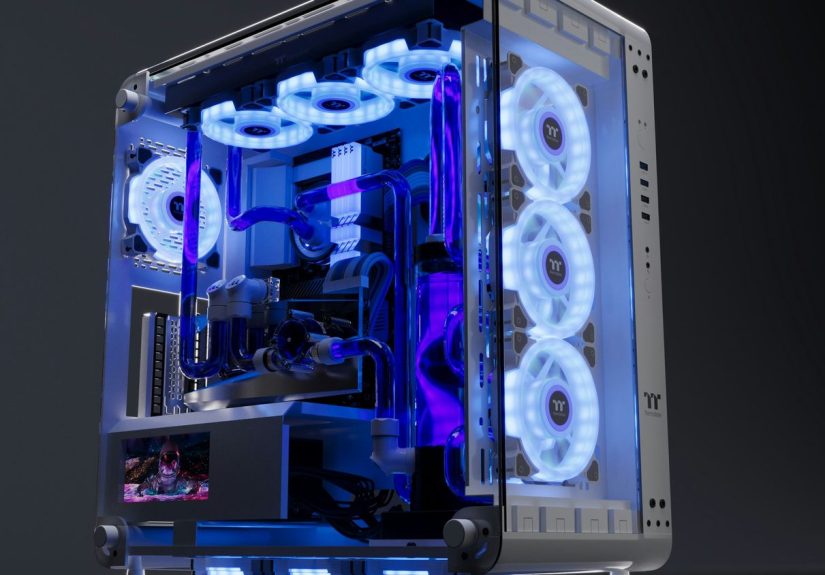
If AIOs are the “plug-and-play” option, custom loops are the “build-your-own-luxury-pool-in-your-backyard” experience. They offer superior cooling, jaw-dropping aesthetics, and full control over every component.
But beware: custom loops require patience, precision, and maintenance. Installation is part art, part engineering, and occasionally part crisis management.
Benefits of Liquid Cooling
Superior Temperature Control
Liquid cooling excels at handling high thermal loads. This makes it ideal for gaming rigs, video editing workstations, 3D modeling setups, and overclocked CPUs that run hotter than the sun.
Quieter Operation
Because radiators can dissipate heat more efficiently, liquid-cooled systems don’t rely on fans spinning at supersonic speeds. Result? Quieter performanceeven when your CPU is playing “Flight Simulator” on ultra settings.
Aesthetic Appeal
Let’s be honest: a well-built liquid cooling loop is PC eye candy. Clear tubes, colored coolant, RGB blocksit’s like watching a sci-fi power plant run inside your case.
More Efficient Heat Transfer
Liquid’s ability to absorb and transport heat beats air in most high-performance scenarios. Your hardware stays cooler longer, even under intense workloads.
Potential Downsides of Liquid Cooling
Higher Cost
Liquid coolingespecially custom loopscan be significantly more expensive than air cooling. You’re paying for pumps, radiators, blocks, tubes, fittings, and sometimes colored coolant that costs more than fancy coffee.
Maintenance Requirements
AIOs require little maintenance, but custom loops need periodic cleaning, refilling, leak testing, and general upkeep. It’s like owning a small pet that lives in your PC.
Risk of Leaks
Modern liquid cooling systems are engineered to be safe, but leaks can happenespecially with custom loops. A poorly tightened fitting could lead to liquid meeting motherboard, which is a combination no one wants.
Should You Choose Liquid Cooling?
Liquid cooling is perfect if you:
- Game at high resolutions or frame rates
- Run demanding creative or technical workloads
- Want quieter performance
- Appreciate beautiful PC builds
On the other hand, air cooling might be better if you want:
- Low maintenance
- Lower cost
- Simple installation
Ultimately, the choice depends on your performance needs, budget, and willingness to maintain your system.
of Personal Experiences With Liquid Cooling
When building PCs over the years, I’ve seen the full spectrum of liquid cooling adventuresfrom absolute victory to “Why is my carpet wet?” panic. One of my first experiences involved installing a 240mm AIO cooler into a mid-tower case that was clearly too cramped. After an hour of maneuvering screws, fans, brackets, and a surprisingly heavy radiator, I realized liquid cooling requires one crucial trait: patience.
Once installed, though, the difference was immediate. Temperatures dropped significantly compared to the stock air coolerby nearly 20 degrees Fahrenheit under load. The system ran smoother, stayed quieter, and I suddenly felt like I had unlocked a secret performance level my hardware had been hiding.
Custom loops, however, were a different beast. My first attempt looked like someone tried to bend tubes after drinking three espressos. Hard tubing requires precisionheat bending, measuring angles, and ensuring you don’t snap anything in half. But after a few tries (and a few choice words), the loop finally came together.
The moment you fill a custom loop with coolant is the moment of truth. You hold your breath, watch the pump push liquid through the system, and look closely for leaks. It’s both thrilling and terrifying. Thankfully, the loop held, and once the system powered on, the cooling performance was unmatched.
Over months of use, temperatures remained consistently low even when running blender renders or gaming marathons. The cooling efficiency was noticeable, and the visual appearance was unbeatable. Watching coolant flow through crystal-clear tubing while RGB lights bounce around the case is strangely calminglike a tech-savvy lava lamp.
However, maintenance became an unavoidable reality. Every 6–12 months, the loop needed flushing, cleaning, and refilling. Dust loves radiators, so cleaning them is mandatory. If you use colored coolant, you might see buildup or staining over time. These tasks aren’t hard, but they take timeanother reason casual users prefer AIOs.
One of the biggest lessons learned is this: liquid cooling is worth it for people who enjoy the process. You’re not just building a PC; you’re crafting a performance machine with its own internal plumbing system. It becomes a hobby within a hobby.
For everyone else, high-quality air coolers or AIOs provide most of the benefit with a fraction of the effort. But if you’re someone who stares at PC builds on Instagram and thinks, “I want mine to look like that,” liquid cooling is calling your name.
Conclusion
Liquid cooling is a high-performance, visually impressive, and surprisingly accessible way to keep modern hardware running at its best. Whether you choose an AIO cooler or build your own loop, the key benefitsquiet operation, better temperatures, and sleek aestheticsmake it a popular choice among enthusiasts.