Table of Contents >> Show >> Hide
- Can You Actually Unsend a Snapchat?
- What You Can Delete on Snapchat
- What You Cannot Truly Unsend
- How to Delete a Snapchat Message or Snap
- What the Other Person Sees When You Delete Something
- How Snapchat’s Deletion Timing Works
- One-on-One Chats vs. Group Chats
- Can Snapchat+ Change Any of This?
- Common Myths About Unsending on Snapchat
- Best Practices Before You Send Anything on Snapchat
- What to Do If Deletion Does Not Work
- Final Thoughts
- Real-Life Experiences: What “Unsending” a Snapchat Actually Feels Like
- SEO Tags
We have all been there. You send a Snapchat a little too fast, then your soul leaves your body half a second later. Maybe it was a typo. Maybe it was the wrong selfie. Maybe it was a message meant for your best friend that somehow landed in the chat with your cousin, your coworker, or that one person you are trying very hard to seem normal around. Suddenly, one question matters more than anything else on planet Earth: can you unsend a Snapchat?
The honest answer is a little annoying, a little comforting, and very on-brand for Snapchat. In some situations, yes, you can delete certain content after sending it. But no, Snapchat does not give you a magical time machine that guarantees nobody saw what you sent. The app lets you delete some messages and some Snaps in Chat, but that is not the same thing as fully erasing your digital footsteps like a tiny disappearing ninja.
This guide breaks down what “unsend” really means on Snapchat, what you can remove, what you cannot truly take back, what the other person will still see, and how to handle those “why did I send that?” moments without turning your phone into a stress ball.
Can You Actually Unsend a Snapchat?
Sort of, but not in the way most people imagine. Snapchat does not usually label the feature as “unsend.” Instead, it gives you options to delete chat messages, delete Snaps in Chat, and remove your own Story posts. That means you may be able to remove content from the conversation after sending it, but there are limits.
Here is the simplest way to think about it:
- Yes: You can delete a text chat message you sent.
- Yes: You can delete a Snap that appears in Chat in certain states.
- Yes: You can delete your own Story Snap after posting it.
- No: You cannot guarantee the other person did not already see it, save it, screenshot it, or capture it another way.
- No: Clearing a conversation from your feed is not the same as unsending anything.
So if you were hoping for a big red emergency button labeled erase my bad decisions, Snapchat is not that generous. What it gives you is closer to a cleanup tool than a true recall button.
What You Can Delete on Snapchat
1. Chat messages
If you sent a regular chat message, you can press and hold it, then tap Delete. This is the closest thing Snapchat has to unsending a message. It works in one-on-one chats and group chats, and it is the feature most people mean when they talk about taking back a Snapchat.
That said, deleting a chat message is not invisible. Snapchat typically leaves a notice in the conversation showing that something was deleted. So while the content may disappear, the evidence that something existed does not always vanish with it. Very dramatic, honestly.
2. Snaps in Chat
If you sent a Snap into a chat thread, Snapchat also lets you delete that Snap in Chat. This matters because many people assume photo and video Snaps are untouchable once sent. In reality, some sent Snaps in Chat can be removed, including when they are delivered and even after they have been opened in certain situations.
Again, this does not mean the other person never saw it. It only means the Snap is removed from the chat view going forward. If they already opened it, screenshot it, screen-recorded it, or grabbed another phone to take a photo like a determined little detective, the deletion will not rewrite history.
3. Saved Snaps that you sent into Chat
Snapchat also allows senders to delete certain Snaps they sent to Chat even after those Snaps were saved in Chat. That is useful if you shared a photo and later decided it really did not deserve a long-term lease in someone else’s conversation thread.
Still, control has limits. Deleting the saved Snap removes that item from the chat, but it does not undo whatever happened before the deletion.
4. Story posts
Posted something to your Story and immediately regretted it? Good news: you can delete a Snap from your Story. So if your “effortlessly cool” post accidentally revealed your messy bedroom, your math homework, or a thumb covering half the lens, you can remove it from your Story feed.
Just keep in mind that if people already viewed it, you cannot unview their eyeballs. Sadly, the internet still has not invented that feature.
5. Some posts from the web
Snapchat also provides web-based options for saving or deleting certain posts under your profile, such as content tied to your Story or Spotlight in supported areas. This is not the same thing as unsending a private message, but it is still useful if you manage your content across devices.
What You Cannot Truly Unsend
Opened content
If the person already opened your Snap or read your message, deleting it afterward does not erase their memory. That sounds obvious, but it matters. A deleted message is not a magic “they never saw it” tool. It is only a removal tool for what remains in the app.
Screenshots and copies
Snapchat is famous for screenshot alerts, and the app can show indicators when someone screenshots a Snap or Chat. But those alerts do not stop screenshots, and they definitely do not stop every possible copy method. Someone can use another device, a screen recorder, or plain old camera trickery. That is why the smartest Snapchat rule is still the oldest one: never send anything you would panic over seeing again.
Cleared conversations
This is one of the biggest misunderstandings on Snapchat. When you clear a conversation, you are mostly removing that chat from your own Chat feed. You are not deleting the actual sent or saved content. In other words, clearing a conversation is like shoving clutter into a closet before guests arrive. The mess is less visible, but it is still very much there.
Recovered deleted memories
If you delete something from Memories, recovery is not guaranteed. In many cases, deleted Memories cannot be restored by Snapchat Support. So do not confuse “delete” with “temporary hide.” On Snapchat, those are very different worlds.
How to Delete a Snapchat Message or Snap
How to delete a chat message
- Open Snapchat.
- Go to the Chat screen.
- Open the conversation.
- Press and hold the message you want to remove.
- Tap Delete.
- Confirm the deletion if prompted.
Once deleted, the content may disappear from the chat, but the other person will often still see that a message was deleted.
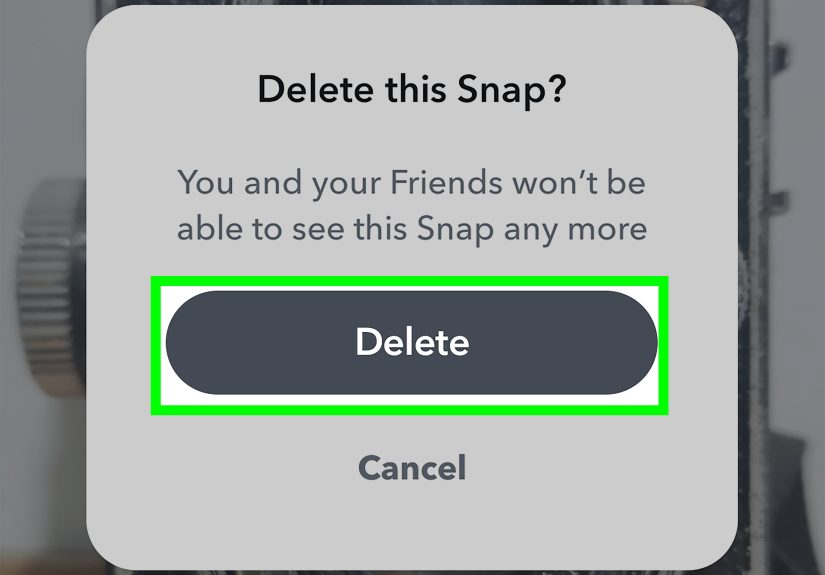
How to delete a Snap in Chat
- Open the chat where the Snap appears.
- Press and hold the Snap.
- Tap Delete.
- Confirm if needed.
This is one of the most useful Snapchat features for damage control, especially when you sent a photo a little too quickly and your brain only caught up afterward.
How to delete a Story Snap
- Go to your profile.
- Open your Story.
- Find the Snap you want to remove.
- Delete that Snap from the Story.
If you posted multiple Snaps, you may need to remove them one by one.
What the Other Person Sees When You Delete Something
This is the part people always want to know, because deleting is only half the story. The other half is social fallout.
In many cases, the recipient will see that a message or Snap was deleted in Chat. So even if the content disappears, the act of deleting is not exactly subtle. It is less “smooth secret agent” and more “the app has entered a formal note into the record.”
That means deleting something may raise curiosity. If the original message was harmless, deleting it can sometimes create more mystery than the message itself. If the original message was truly embarrassing, though, deleting it is still usually worth it.
How Snapchat’s Deletion Timing Works
Snapchat is built around temporary content, but temporary does not always mean immediate. In one-on-one and group conversations, chats are typically deleted automatically after everyone has viewed them for a certain period, or after a time limit if they remain unopened. Users can also change chat deletion settings in some conversations so chats disappear right after viewing, after several days, or remain saved.
That matters because many people assume all Snapchat content self-destructs instantly. Not quite. Some content lingers longer than expected, especially in chats, saved threads, or group conversations. Unopened one-on-one Snaps can also remain on Snapchat’s servers for a period before the system deletes them automatically.
Translation: “It disappears on Snapchat” is real, but the timing depends on the type of content, whether someone saved it, and the settings in that conversation.
One-on-One Chats vs. Group Chats
Deleting on Snapchat gets slightly more complicated in groups, because more people means more opportunities for someone to have already seen, saved, or screenshotted your message. In a group, once a message is out there, the odds of at least one person catching it increase fast. It is like dropping fries near seagulls. The reaction time is immediate.
Snapchat does let users delete messages in group chats, but the same warning applies: it may not fully erase the impact. Group chats also have their own deletion defaults, and saved content can behave differently from ordinary disappearing chats.
Interestingly, Snapchat notes that if you leave a group chat, the Snaps and Chats you sent may be cleared from that group, even if someone had saved them. That is a niche detail, but it shows how group mechanics can differ from private chats.
Can Snapchat+ Change Any of This?
Snapchat+ adds extra features, but it does not turn unsending into wizardry. The premium service can affect how replay works, including extra replay options in supported features, but it does not transform deleted content into a guaranteed “nobody saw that” outcome.
So if you subscribe hoping for elite-level message recall powers, save your expectations. Snapchat+ is more like bonus seasoning than a whole new kitchen.
Common Myths About Unsending on Snapchat
Myth: Clearing a chat unsends messages
Reality: No. It mainly removes the conversation from your feed, not the actual saved or sent content.
Myth: If I delete it fast enough, they definitely did not see it
Reality: Maybe they did, maybe they did not. Fast deletion helps, but it is never a guarantee.
Myth: Snapchat prevents people from saving my stuff
Reality: Snapchat gives alerts and temporary design features, but people can still screenshot or capture content.
Myth: Unsending works the same for chats, Snaps, Stories, and Memories
Reality: Not even close. Each content type has different rules.
Best Practices Before You Send Anything on Snapchat
- Double-check the recipient before sending.
- Pause for three seconds before tapping send. Those three seconds can save your soul.
- Avoid sending anything you would hate to have screenshotted.
- Know the difference between deleting a message and clearing a conversation.
- Review your Story before posting, especially if you are half awake, overly caffeinated, or trying too hard to be funny.
What to Do If Deletion Does Not Work
Sometimes deletion fails because of app version issues, syncing problems, or connection trouble. If Snapchat does not remove the content the way you expect, try updating the app, checking your internet connection, reopening Snapchat, or logging out and back in. Those steps will not solve every problem, but they are the first things to try before declaring war on your phone.
Final Thoughts
So, can you unsend a Snapchat? In practice, yes, sometimes, but only in a limited, Snapchat-style way. You can delete chat messages, remove certain Snaps in Chat, and take down your own Story posts. But you cannot guarantee that nobody saw the content, saved it, or copied it before you deleted it.
The smartest way to use Snapchat is to treat deletion as a backup plan, not your main plan. Think of it like a seatbelt, not a teleportation device. Helpful? Absolutely. Magical? Not even a little.
If you remember one thing from this article, let it be this: on Snapchat, “delete” can reduce the damage, but it does not always erase the moment. Send wisely, delete quickly when needed, and maybe do not hit send while emotionally improvising.
Real-Life Experiences: What “Unsending” a Snapchat Actually Feels Like
Using Snapchat’s delete tools in real life is rarely a calm, elegant experience. It is usually more like a mini action movie that takes place entirely in your thumbs. One second you are casually chatting. The next second you notice you sent the wrong message, and suddenly time slows down. You open the chat, hold your breath, press and hold the message, and hope the delete option appears like a superhero making a very late entrance.
For some people, the feature is a lifesaver for tiny mistakes. Maybe autocorrect turned a normal sentence into something bizarre. Maybe you sent a blurry selfie that made you look like you had been photographed by a potato. Maybe you dropped a joke into the wrong group chat and realized, a little too late, that not every audience appreciates your humor. In those situations, deleting a message can feel wonderfully practical. The content disappears, the crisis calms down, and you live to snap another day.
But people also learn very quickly that deleting is not the same as controlling the whole situation. If the other person already saw the message, the emotional damage may already be done. If they saved it, screenshotted it, or mentioned it out loud five seconds later, the delete button starts to feel less like a solution and more like a symbolic gesture. Helpful, yes. Omnipotent, no.
Many users also discover that the deletion notice can create its own awkward moment. Sometimes the deleted message was more suspicious after it disappeared than it ever would have been if it had stayed. A boring typo can suddenly look like a state secret once the app tells the other person that a message was deleted. It is the digital version of whispering, “Never mind,” in a room full of curious people.
Stories create a different kind of experience. Deleting a Story Snap often feels cleaner because it is more obviously about managing your own post. Maybe the lighting was bad. Maybe the caption was cringe. Maybe you realized your location, your school, or some random private detail was more visible than you wanted. Pulling it down can feel smart and immediate. Still, if enough people saw it first, the memory of the post may outlive the post itself.
The biggest lesson most Snapchat users learn is simple: the delete feature is useful, but peace of mind comes more from better sending habits than from better damage control. People who use Snapchat a lot tend to get more careful over time. They check the recipient name twice. They review a photo before sending it. They stop assuming temporary apps make permanent consequences impossible. In that sense, the real experience of “unsending” a Snapchat is not just about deleting content. It is about learning where the app helps, where it does not, and how to avoid needing a rescue button in the first place.