Table of Contents >> Show >> Hide
- Quick Reality Check: Unfriended vs. Blocked vs. “Snapchat Being Snapchat”
- Way #1: Check Your Friends List (The Most Direct Method)
- Way #2: Check Their Profile for Snap Score (And Other “Friend-Only” Clues)
- Way #3: Send a Message/Snap and Watch for “Pending” (The Gray-Area Test)
- Bonus Clues (Helpful, But Not Always “Proof”)
- What Not to Do (Unless You Love Regret)
- Conclusion
- Experiences People Commonly Have (And What They Usually Mean)
- 1) “I can still find them, but their profile feels… colder?”
- 2) “My Snap went ‘Pending’ and I immediately aged 40 years.”
- 3) “Their Story disappeared, but my friend still sees it.”
- 4) “I’m trying to be chill, but I keep checking like it’s a stock price.”
- 5) “I got unfriended, re-added, then unfriended again. What is thistennis?”
Snapchat is famously loud about the things it wants you to notice (screenshots! replays! “someone is typing…”),
and hilariously quiet about the things you really want to knowlike whether someone just quietly removed you.
No alert. No siren. No tiny violin emoji.
If you’re here, you’re probably noticing a vibe shift: their Story vanished, your Snap is stuck in limbo, or their profile suddenly looks
like a blank apartment with no furniture. The good news: you can usually confirm what happened in under two minutes.
The better news: you can do it without any sketchy third-party “who deleted me” apps (please don’t invite malware to the party).
Below are three reliable ways to tell if someone unfriended you on Snapchatplus how to spot the difference between
being unfriended, blocked, or just… victims of a glitchy Wi-Fi moment.
Quick Reality Check: Unfriended vs. Blocked vs. “Snapchat Being Snapchat”
Before we play detective, here’s what these situations usually mean in plain English:
- Unfriended / Removed / Unadded: They deleted you from their friends list. You might still find them in Search, and you may still see public content depending on their settings.
- Blocked: They made you digitally invisible. You generally won’t be able to find their profile from your account, and your messages won’t go through.
- Privacy settings / Public profile / Glitch: Snapchat settings and connection issues can imitate “unfriended” symptoms. (Yes, it’s annoying. Yes, it’s on brand.)
Think of Snapchat like a club with a bouncer. Unfriended is “you’re not on the VIP list anymore.” Blocked is “you’re not allowed
in the building and the bouncer pretends you don’t exist.” A glitch is “the bouncer is on break and nobody knows what’s happening.”
Way #1: Check Your Friends List (The Most Direct Method)
If you want the cleanest answer, start here. Snapchat won’t notify you when someone removes you, but your Friends list is still the source of truth.
Step-by-step
- Open Snapchat and tap your profile icon / Bitmoji (top-left).
- Tap My Friends.
- Use the search bar to type their display name or username.
How to read the results
- If they show up in My Friends: You’re still friends. (Congrats. Please breathe.)
- If they don’t show up: They likely unfriended you… or blocked you… or deleted their account.
If they’re missing from your Friends list but you can still find them through Search, that often points to unfriended rather than blocked.
If you can’t find them at all (and especially if your chat thread disappeared), blocking becomes more likely.
Pro tip (aka: the “don’t spiral” rule)
If you recently updated the app, switched phones, or your connection is spotty, don’t treat one weird refresh as a breakup.
Snapchat can lag in showing friend statusso use this method plus at least one more below for confirmation.
Way #2: Check Their Profile for Snap Score (And Other “Friend-Only” Clues)
One of the fastest tells is the Snap Score. In most cases, you can only see someone’s Snap Score when you’re friends.
So if you used to see it and now it’s gone, that’s a strong hint you’ve been removed.
Step-by-step
- Tap Search and look up their username.
- Tap their profile (or open an existing chat and tap their Bitmoji/name).
- Look for their Snap Score under their name.
What it usually means
- Snap Score is visible: You’re very likely still friends.
- Snap Score is missing: You may have been unfriended (or blocked), or their profile visibility/settings may be limiting what you can see.
Don’t treat Snap Score like a magical lie detector. It’s a helpful clue, not a courtroom confession.
Settings, public profiles, and occasional Snapchat weirdness can affect what shows up.
That said, if you definitely used to see the score and now you can’t, it’s one of the strongest “yep, something changed” signals.
Friendship Profile clues to look for
When you’re friends with someone, their profile tends to feel… complete. When you’re not, it can feel stripped down.
Depending on app version and privacy settings, you may notice fewer friendship-related sections, fewer interaction options,
or a more limited view overall.
Example: Yesterday you could tap their profile and see a Snap Score like “128,450”. Today that number is gone,
and the profile looks like a “lite” version. That patternespecially combined with Way #1is usually a solid confirmation.
Way #3: Send a Message/Snap and Watch for “Pending” (The Gray-Area Test)
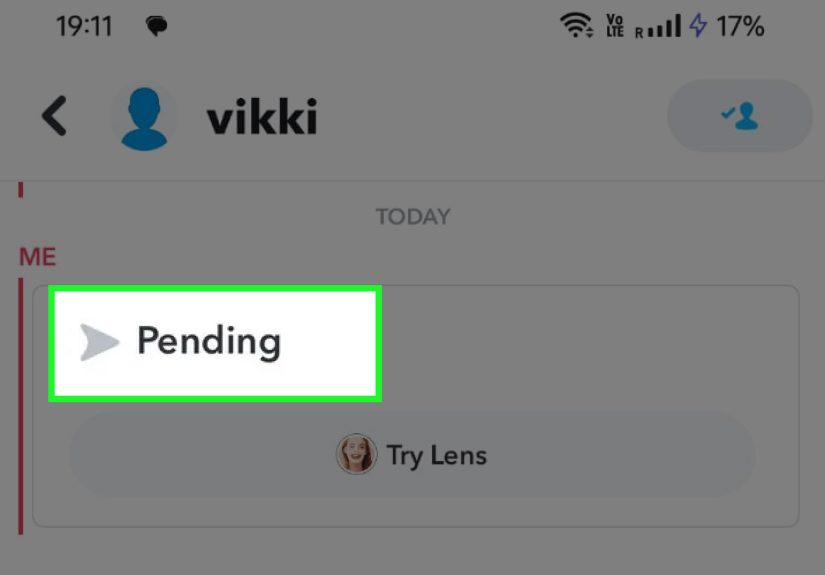
This is the method people stumble into accidentally: you send a Snap, and instead of the normal sent/delivered flow,
you see Pending with a gray icon. Snapchat is basically saying: “I tried. The door is… complicated.”
How to do it without being dramatic
- Open your chat with them (or start a new one).
- Send a simple chat like “hey” or a normal Snap (no essay, no Shakespeare).
- Look at the status under the message.
What “Pending” can mean
- They haven’t accepted your friend request (or re-added you).
- They unfriended you (so your message is waiting in limbo until they add you again).
- They blocked you (sometimes you’ll see “Pending” behavior; other times you simply can’t reach them).
- Your internet is acting up or Snapchat is having an outage (yes, it happens).
The key is context. If you were friends yesterday, and today your message instantly flips to Pending,
that’s a meaningful clue. If you’ve never messaged them before (or you just added them), Pending may simply mean they haven’t accepted yet.
How to separate “unfriended” from “bad Wi-Fi”
- Try sending a message to someone else. If everything else works, it’s probably not your connection.
- Switch Wi-Fi/cellular or restart the app. If Pending persists only with that person, it’s likely a relationship status issue, not a router tantrum.
- Cross-check with Way #1 (Friends list) or Way #2 (Snap Score).
Bonus Clues (Helpful, But Not Always “Proof”)
Their Story disappeared
If you used to see their private Story and now you don’t, you might be removed.
But this is not definitivebecause they could’ve changed Story privacy, stopped posting, or made the Story public/private differently.
You can still search them, but you see an “Add” button
If their profile appears in Search and Snapchat prompts you to Add them, that’s commonly what you’ll see after being removed.
(If you were blocked, they’re more likely to be unsearchable from your account.)
Chats look weird or “empty”
Snapchat’s chat behavior can be confusing because messages can disappear based on settings. So don’t use chat history alone as evidence.
Use it as a supporting clue alongside friends list, Snap Score, and Pending behavior.
What Not to Do (Unless You Love Regret)
- Don’t use third-party “unfriend tracker” apps. They’re often privacy nightmares and can put your account at risk.
- Don’t spam messages to test delivery. One quick test is enough. Repeated “hey???” snaps are how you end up blocked for real.
- Don’t assume malice instantly. People change settings, lose phones, delete apps, and take social breaks.
If you truly need clarity (close friend, important conversation), the healthiest option is often the least “Snapchat detective” option:
ask politelyoff Snapchat if needed.
Conclusion
Snapchat won’t send you a “Congratulations, you’ve been removed” banner (rude), but you can still figure it out with a simple checklist:
check your Friends list, look for Snap Score changes, and test for Pending.
Use at least two methods before you call itbecause privacy settings and glitches can mimic the signs.
And if you did get unfriended? It stings for about 12 minutes, then you remember the greatest truth of the internet:
life is too short to argue with an app that thinks a dog face counts as communication.
Experiences People Commonly Have (And What They Usually Mean)
Let’s talk about the part nobody admits out loud: the experience of suspecting you’ve been unfriended feels like trying to read a mystery novel
where every page is also a mirror. People don’t just want the “how.” They want the “is this what’s happening to me right now?”
Here are some common scenarios users reportand the most likely explanation behind each one.
1) “I can still find them, but their profile feels… colder?”
This is a classic. Yesterday you tapped their Bitmoji and saw the little signs of an active friendshiplike a Snap Score you casually pretended you never noticed.
Today, you tap again and it looks like a minimalist art exhibit: name, username, maybe a public-facing shell, and not much else.
For many people, that shift lines up with being removed. It’s not always personal; sometimes it’s a cleanup.
Some users do “friend list declutters” the way other people do closet purges: ruthlessly and with snacks.
2) “My Snap went ‘Pending’ and I immediately aged 40 years.”
Pending is the emotional jump-scare of Snapchat. You send a normal message and suddenly it’s in gray limbolike your Snap is waiting for a job interview call back.
People often assume they’re blocked in that moment, but Pending can also happen if you’re no longer friends or if the other person hasn’t accepted a request.
The experience tends to go: panic → research spiral → checking Friends list → relief or acceptance.
If you want to save your sanity, do the boring tests first (Friends list and Snap Score) before you write a dramatic internal monologue.
3) “Their Story disappeared, but my friend still sees it.”
This one is sneaky because it feels like proof. If a mutual friend can still see the Story and you can’t, it’s reasonable to suspect you’ve lost access.
But there are multiple explanations: you could be removed, you could be excluded via Story privacy settings, or the person could be posting to a private Story list you’re not on.
The experience here is less “you’ve been exiled” and more “you’re not in that audience anymore,” which is still a kind of answer.
4) “I’m trying to be chill, but I keep checking like it’s a stock price.”
A lot of users describe this: refreshing the chat screen, searching the username again, then again, like the outcome will change if you stare hard enough.
(It won’t. Snapchat is not a magic eight ball, and your phone screen isn’t a crystal.) The healthiest pattern people land on is:
check once using two methods, accept the result, then stop feeding the uncertainty loop.
If you were removed, no amount of refreshing turns it into friendship againonly a conversation does.
5) “I got unfriended, re-added, then unfriended again. What is thistennis?”
Yes, this happens. Sometimes it’s accidental (people tap the wrong option), sometimes it’s impulsive (a fight), and sometimes it’s about boundaries.
Users who’ve been through this tend to say the same thing afterward: the technical signs are easy; the emotional meaning is the hard part.
If you’re stuck in an add/remove loop, the best “experience-based” takeaway is to stop treating Snapchat status as the conversation.
It’s a symptom, not the message.
Bottom line: most experiences fall into a few repeatable patterns. Use the tools above to confirm what’s happening,
then decide what you want to do with that informationbecause the app can tell you what changed, but only you can decide what it means.